Building Tirraflow Part 2: Keycloak Silent SSO in React, No Loading Screens
In Part 1, I mentioned that most Keycloak tutorials block the entire app with a "Loading authentication..." screen. That's a dealbreaker for a blog — most visitors are anonymous readers who don't...
In Part 1, I mentioned that most Keycloak tutorials block the entire app with a "Loading authentication..." screen. That's a dealbreaker for a blog — most visitors are anonymous readers who don't care about auth.
So I made it non-blocking: the app renders instantly, Keycloak resolves in the background. Here's how.
The Problem
The textbook approach gates your entire app behind Keycloak initialization:
// Don't do this
if (!keycloakReady) return <div>Loading authentication...</div>;
return <YourApp />;
Every page load pays 200-500ms of blank screen. For a blog where 95% of visitors never log in, that's unacceptable.
The Fix: Render First, Auth Later
The Keycloak Singleton
// src/api/keycloak.js
const keycloak = new Keycloak({
  url: import.meta.env.VITE_KEYCLOAK_URL,
  realm: import.meta.env.VITE_KEYCLOAK_REALM,
  clientId: import.meta.env.VITE_KEYCLOAK_CLIENT_ID,
});

let initPromise = null;

export const init = () => {
  if (!initPromise) {
    initPromise = keycloak.init({
      onLoad: 'check-sso',
      silentCheckSsoRedirectUri:
        window.location.origin + '/silent-check-sso.html',
      pkceMethod: 'S256',
    });
  }
  return initPromise;
};
Three things matter here:
check-ssoopens a hidden iframe instead of redirecting. The user stays on your page.pkceMethod: 'S256'— non-negotiable for public clients. Prevents authorization code interception.Promise caching — if
init()gets called twice before resolving, both callers share one request.
The Silent Check Page
The iframe redirects to this 3-line HTML file, which posts the tokens back to the parent window:
<!-- public/silent-check-sso.html -->
<html><body><script>
  parent.postMessage(location.href, location.origin);
</script></body></html>
How It All Connects
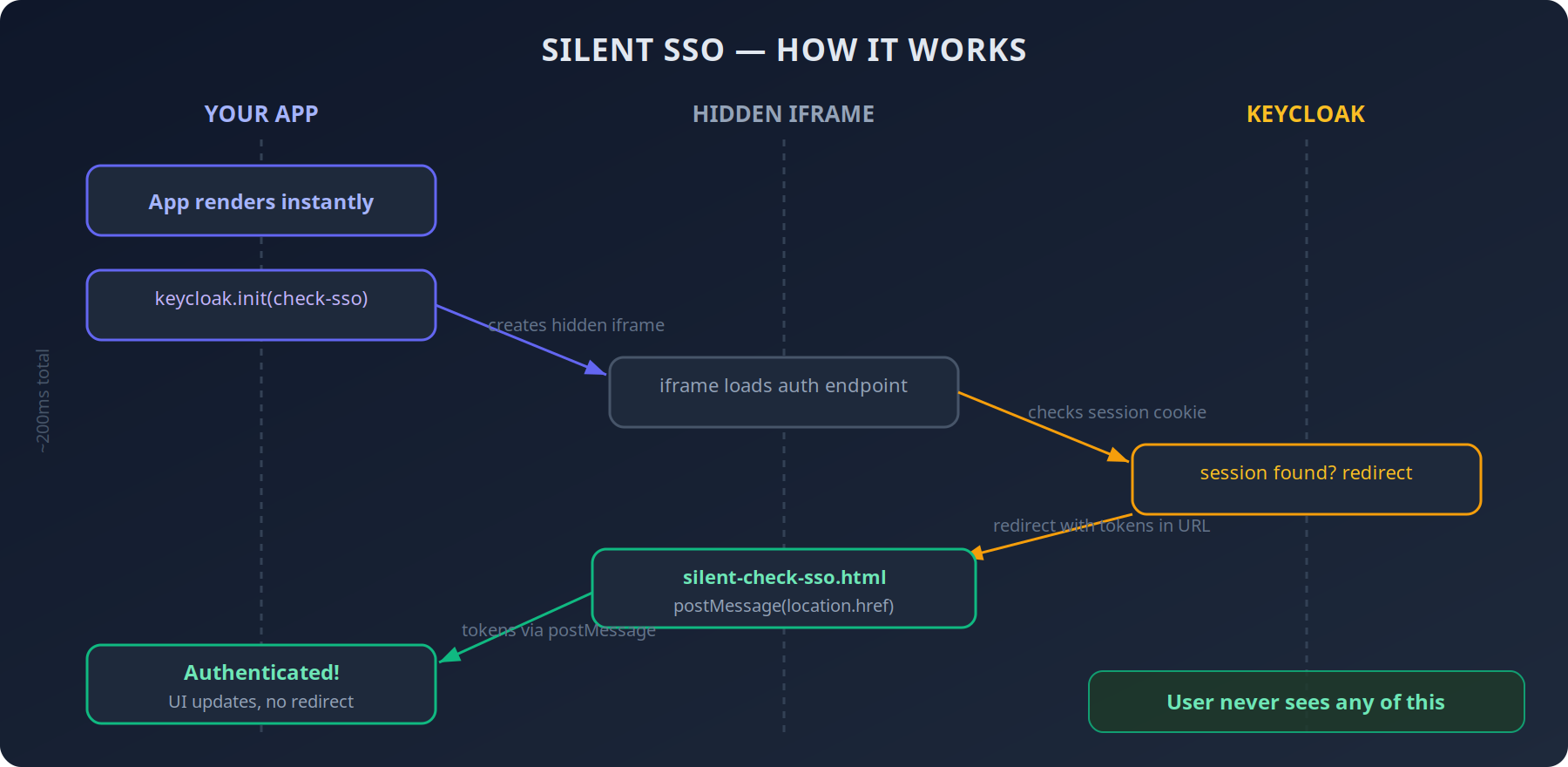
The entire flow completes in ~200ms. The user never sees any of it.
The Non-Blocking Provider
// src/contexts/AuthProvider.jsx (simplified)
function AuthProvider({ children }) {
  const [initialized, setInitialized] = useState(false);
  const [authenticated, setAuthenticated] = useState(false);

  useEffect(() => {
    init()
      .then((auth) => {
        setAuthenticated(auth);
        if (auth) { /* extract user, roles */ }
        setInitialized(true);
      })
      .catch(() => setInitialized(true)); // render anyway
  }, []);

  // No loading gate — children render immediately
  return (
    <AuthContext.Provider value={{ initialized, authenticated }}>
      {children}
    </AuthContext.Provider>
  );
}
The key: no if (!initialized) return <Loading />. Children render right away. When Keycloak finishes, auth-dependent components re-render. The homepage, articles, categories — they all load instantly.
For the rare page that needs auth (profile, dashboard), the initialized flag is available:
if (!initialized) return <ProfileSkeleton />;
if (!authenticated) return <Navigate to="/" />;
Token Refresh: Two Layers
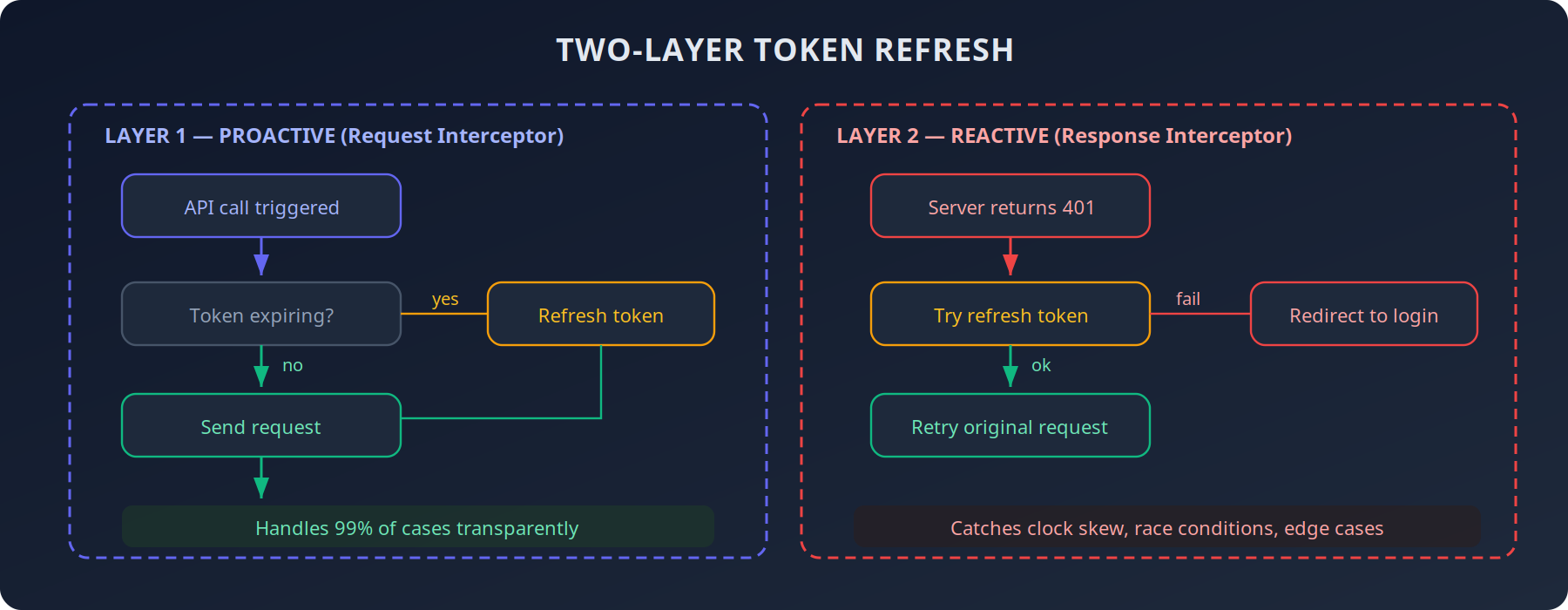
Tokens expire. If you don't handle this well, users get randomly logged out. I use two layers:
// Request interceptor — proactive
client.interceptors.request.use(async (config) => {
  if (keycloak.authenticated && keycloak.isTokenExpired()) {
    await keycloak.updateToken(30);
  }
  if (keycloak.token) {
    config.headers.Authorization = `Bearer ${keycloak.token}`;
  }
  return config;
});

// Response interceptor — reactive
client.interceptors.response.use(null, async (error) => {
  if (error.response?.status === 401) {
    try {
      await keycloak.updateToken(5);
      error.config.headers.Authorization = `Bearer ${keycloak.token}`;
      return client.request(error.config);
    } catch { keycloak.login(); }
  }
  return Promise.reject(error);
});
Layer 1 handles 99% of cases. Layer 2 catches edge cases — clock skew, tokens expiring mid-flight, race conditions. Individual API calls never need to handle 401s.
Roles: Frontend Shows, Backend Enforces
Keycloak stores roles in two places in the JWT. You need both:
const realmRoles = keycloak.tokenParsed?.realm_access?.roles || [];
const clientRoles =
  keycloak.tokenParsed?.resource_access?.['tirraflow']?.roles || [];
const roles = [...new Set([...realmRoles, ...clientRoles])];
The AuthProvider computes permissions from these roles:
const canEditPost = (post) =>
  isAdmin || isEditor || post.author_id === user?.id;
Components just consume useAuth() and never think about role logic. But the frontend is purely cosmetic — the Go backend validates every request independently using the same JWT claims.
The Nginx Header That Makes It All Work
Silent SSO relies on an iframe embedding Keycloak. Browsers block this by default. You need one CSP header on the Keycloak server:
# On auth.tirraflow.com
add_header Content-Security-Policy
    "frame-ancestors 'self' https://tirraflow.com" always;
Without this, the iframe silently fails. No error. No warning. Users just appear permanently logged out.
Also bump proxy buffers — Keycloak's redirect responses are large:
proxy_buffer_size 128k;
proxy_buffers 4 256k;
Default Nginx buffers (4k) will truncate them, causing random 502s during login.
Pitfalls I Hit
Silent iframe failures are invisible. Wrong CSP? The iframe just doesn't work. No console error. Check
frame-ancestorsfirst.Token refresh race conditions. Three concurrent API calls with an expired token = three refresh attempts.
keycloak-jshandles this internally, but be careful wrapping it in custom logic.Clock skew. Server clock 2 seconds ahead of client? Valid-looking tokens get rejected. The two-layer refresh catches this.
PKCE is not optional. No client secret in a SPA means anyone intercepting the auth code can exchange it for tokens.
pkceMethod: 'S256'is one line. Just do it.
The Result
Anonymous visitors see the blog instantly. Zero auth overhead.
Returning users get silently authenticated in ~200ms. Their avatar just appears in the navbar.
Token refresh is transparent. No random logouts.
Roles work identically on frontend and backend.
No custom auth system. No loading screens. Just careful orchestration.
Update: Keycloak Moved Same-Origin
This post originally served Keycloak from auth.tirraflow.com and allowed the SPA to frame it with frame-ancestors. That worked, until browsers started partitioning cookies inside cross-site iframes. The silent-SSO iframe could no longer see Keycloak's session cookie, and the symptom was exactly the one this post set out to avoid: logged out on every refresh.
The fix was to stop being cross-site. Keycloak now lives under /auth on the same origin as the blog, so the iframe is first-party and shares the cookie jar:
# nginx — Keycloak served same-origin
location /auth/ {
    proxy_pass http://keycloak_upstream;
    proxy_buffer_size       128k;
    proxy_buffers         4 256k;
    proxy_busy_buffers_size 256k;
}
Keycloak needs to know about the prefix in two places, and they must agree: KC_HTTP_RELATIVE_PATH=/auth and KC_HOSTNAME=https://tirraflow.com/auth. Keycloak builds issuer and redirect URLs from the hostname and does not append the relative path, so leaving /auth off the hostname produces tokens with the wrong issuer.
A second trap arrived with the Content-Security-Policy. The silent-check page used an inline <script>, which script-src 'self' blocks, so keycloak-js never heard back from the iframe. The callback now lives in an external silent-check-sso.js, both files are served with Cache-Control: no-store so a stale copy can't break auth again, and the CSP is simply frame-src 'self' and connect-src 'self'. The old subdomain still exists, but only as a redirect to /auth.
What's Next
Part 3: E2E Testing a React SPA with Playwright — testing the whole frontend with no backend at all.
The Series
Building Tirraflow is a 5-part series on how the platform you are reading was built and run; every part is linked below.
Part | Topic |
|---|---|
The stack, the architecture, and what I learned shipping it | |
Part 2 (this post) | Non-blocking auth for a SPA, and why Keycloak ended up same-origin |
Testing the whole frontend with no backend at all | |
From push to production, and how the pipeline learned to roll back | |
How it got in, and the six layers that keep it out |