Building Tirraflow Part 5: Hardening the VPS After a Cryptominer Got In
One day my little VPS — the one running Tirraflow — was suddenly burning CPU it had no reason to burn. A cryptominer had found its way in. I cleaned it up, but cleanup is the easy part. The real...
One day my little VPS — the one running Tirraflow — was suddenly burning CPU it had no reason to burn. A cryptominer had found its way in. I cleaned it up, but cleanup is the easy part. The real question is: how did it get in, and how do I make sure it can't happen again?
This post is the answer. No fancy tooling — just a methodical, layered hardening of a single Docker-Compose server. Everything here is defensive and reproducible on any small VPS.
How It Got In
The post-mortem was humbling, because the entry path was boring. Two ordinary misconfigurations lined up into a straight road to root:
SSH password authentication was enabled. Bots brute-force port 22 around the clock. A username plus a guessable password is all they need.
The deploy user had a password and was in the
dockergroup. Membership in thedockergroup is effectively root — the Docker socket can mount the host filesystem. So a single weak password didn't grant "a normal account," it granted the whole machine.
Chain those together and the attack is almost trivial:
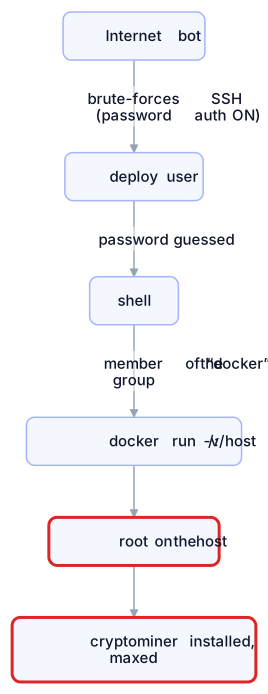
The lesson isn't "I picked a bad password." It's that one weak control can erase every other control. Defense has to be layered.
Step 0: Confirm the Box Is Actually Clean
Before hardening, make sure you're not hardening around a backdoor. A quick triage checklist for any Linux host:
Check | Looking for |
|---|---|
| Unexpected CPU hogs / odd process names |
| Persistence that re-installs the payload |
| Attacker-planted keys |
| Services listening on public interfaces that shouldn't be |
| Rootkits / dropped binaries |
SSH auth log | Which account logged in, from where, by which method |
That last one is gold. My auth log showed exactly one successful password login — from a cloud IP that wasn't me — while every legitimate login used a key. That single line confirmed both the account used and the method, and pointed straight at the root cause.
Layer 1: The Front Door — SSH
The most important fix. Make SSH key-only and stop accepting passwords entirely:
# /etc/ssh/sshd_config.d/99-hardening.conf
PasswordAuthentication no
KbdInteractiveAuthentication no
PermitRootLogin no
PubkeyAuthentication yes
Validate and reload — never blindly restart and lock yourself out:
sudo sshd -t && sudo systemctl reload sshdTwo more touches:
AllowUsers— explicitly list who may log in. Anyone not on the list is rejected before authentication even starts. (Just remember to include your automation account, or your CI/CD will silently start failing.)fail2ban— bans IPs after repeated failures. With password auth off it's belt-and-suspenders, but it keeps the noise (and log spam) down.
With password auth disabled, the brute-force road simply ends. The bots keep knocking; the door no longer opens.
Layer 2: Don't Expose What Doesn't Need Exposing
The database, the auth server, the admin panel — none of these should be reachable from the internet. In a Docker-Compose setup the trap is publishing ports you only meant for internal use:
# DON'T — binds to 0.0.0.0, reachable from the whole internet
ports:
  - "5432:5432"

# DO — bind to localhost only (reach it via an SSH tunnel when needed)
ports:
  - "127.0.0.1:5432:5432"

# BEST — don't publish at all; talk over the internal Docker network
# (no "ports:" entry; only the reverse proxy is public)
The shape you want: only the reverse proxy is exposed (80/443), everything else lives on an internal network.
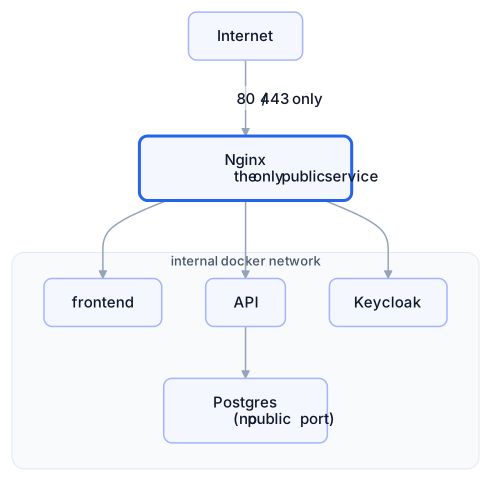
A trap worth calling out: on many distros Docker writes its own iptables rules that bypass firewalld/ufw for published ports. So a port can be open to the world even though your firewall "blocks" it. After every deploy, verify reality from the host:
ss -tlnp # expect only 22, 80, 443 on 0.0.0.0Layer 3: Contain the Blast Radius
Assume a service will eventually be exploited. The goal is to make that foothold as boring as possible. Two cheap container settings do a lot:
services:
  api:
    security_opt:
      - no-new-privileges:true   # block setuid privilege escalation
    deploy:
      resources:
        limits:
          cpus: "1.0"            # a miner can't eat the whole box
memory: 512Mno-new-privilegesstops a process from gaining more privileges via setuid binaries — a common local-escalation trick.CPU/memory limits won't stop a breach, but they cap the damage. A cryptominer that can only have one core is a far smaller problem (and far easier to notice) than one that pins all of them.
If the container doesn't need to write to its own filesystem, add read_only: true with a small tmpfs for scratch space.
Layer 4: Hardening at the Application Edge
A few HTTP- and app-level controls close off the easy abuse paths:
Control | Why it matters |
|---|---|
HSTS header | Forces HTTPS for every future visit, blocking downgrade/strip attacks |
Content-Security-Policy | Limits where scripts/connections can go — contains XSS |
Rate limiting at the proxy | Drops floods before they reach the app (cheaper there than in code) |
Trusted-proxy config | So the app trusts the real client IP only from the proxy, not a spoofed header |
Upload validation | Type + size and dimension checks — a tiny "pixel-flood" image can decode to gigabytes and OOM the server |
The trusted-proxy one is subtle and worth a sentence. Many frameworks trust X-Forwarded-For by default. Behind a proxy that means a client can spoof their IP — defeating per-IP rate limits and poisoning logs. Tell the app to trust that header only when it comes from your proxy's network.
And the image upload one bit me on review: validating content-type and a 10 MB cap isn't enough. Decode the header first and reject absurd dimensions before processing:

Layer 5: Keep the Host Patched — and Reboot
Automatic updates are great, with one catch I almost missed: they install new kernels but never reboot. My server had a fully-patched kernel sitting on disk while still running a months-old one — so the running system had known, already-fixed vulnerabilities live.
# Is a reboot needed to activate patched core libs / kernel?
needs-restarting -r
If it says a reboot is required, schedule one. With restart: unless-stopped on your containers, the whole stack comes back on its own in seconds. "Updates installed" and "updates running" are not the same thing.
Bonus: Secure CI/CD Without Re-opening the Door
Automated deploys need credentials, and it's tempting to hand them broad access. Don't. The model that keeps things tight uses two different, narrow credentials:
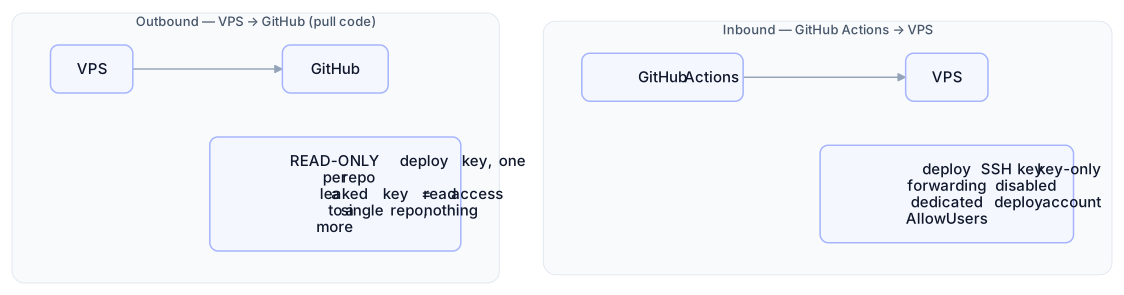
The principle: every credential should do exactly one job and no more. A scoped, read-only key that leaks is an incident; an account-wide read/write key that leaks is a catastrophe.
One more hard-won habit: never edit config directly on the server. A manual tweak left the repo "dirty," which silently blocked git pull on every future deploy — so the pipeline kept "succeeding" while shipping stale config. Make the deploy script fail loudly (set -euo pipefail, git pull --ff-only) and treat the server's files as read-only artifacts of Git.
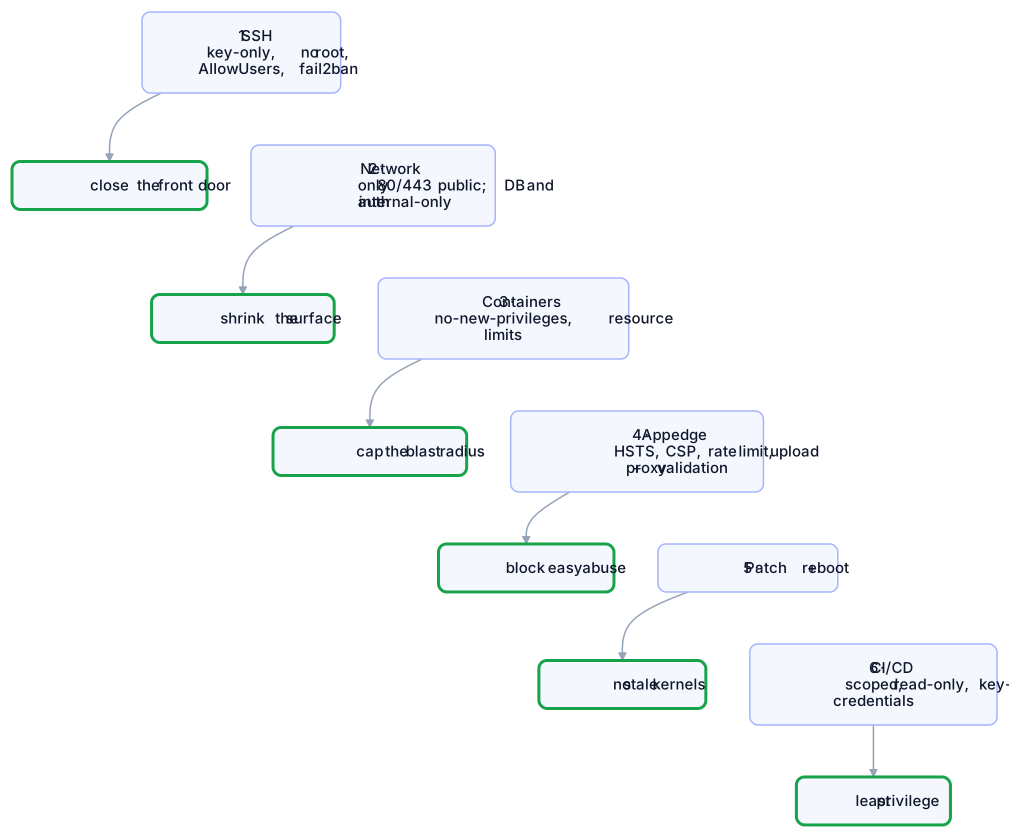
Defense in Depth, On One Page
No single layer is the answer. Stacked, they turn "one weak password = full compromise" into "an attacker has to beat all of these":
Takeaways
The boring stuff is what gets you. Not a zero-day — password auth plus an over-privileged account.
The
dockergroup is root. Treat any account in it like a root account: key-only, locked password, minimal exposure.Don't publish internal ports, and verify with
ss -tlnp— Docker can punch through your firewall.Layer your defenses so no single mistake is fatal.
Installed ≠ running. Reboot to activate kernel patches.
Least privilege for automation too — scoped, read-only, single-purpose credentials.
Cleaning up the miner took an afternoon. Building the layers so it can't recur took a bit longer — and was the only part that actually mattered.
The Series
Building Tirraflow is a 5-part series on how the platform you are reading was built and run; every part is linked below.
Part | Topic |
|---|---|
The stack, the architecture, and what I learned shipping it | |
Non-blocking auth for a SPA, and why Keycloak ended up same-origin | |
Testing the whole frontend with no backend at all | |
From push to production, and how the pipeline learned to roll back | |
Part 5 (this post) | How it got in, and the six layers that keep it out |