Building AI Agents for DevOps Part 9: Google Chat Integration
In Part 2, I brought the Orrery DevOps assistant to Slack. Socket Mode, a 5-minute setup, done. But not every org lives in Slack — plenty of teams run on Google Workspace, and "can I use this from...
Updated for Orrery 0.6.0 (October 2026). Google Chat now also runs over Pub/Sub, with workers that scale on backlog and de-duplicate messages. Approvals are a reply in the card's thread, the one channel that works over Pub/Sub. Since 0.6.0 the "Investigating…" card lists each specialist and its tool calls as they run (Part 16).
In Part 2, I brought the Orrery DevOps assistant to Slack. Socket Mode, a 5-minute setup, done. But not every org lives in Slack — plenty of teams run on Google Workspace, and "can I use this from Google Chat?" is a question I kept getting.
So I added a second transport: a Google Chat bot that reuses the exact same root_agent, the same RBAC, the same guardrails. No duplicated logic. Just a different front door.
This post is about the interesting parts — the surprises Google Chat threw at me, and how the design kept the core transport-agnostic even when the platform really wanted me to hard-code things.
The Goal: Same Agent, Another Surface
The mental model is the same as the Slack bot:
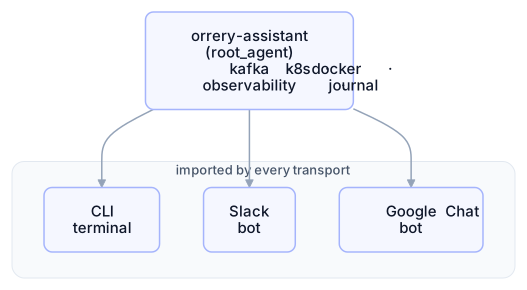
One agent, three front doors. Each transport owns its own identity, approval UI, and session mapping, but they all hand work to the same ADK Runner running the same agent tree.
The Architecture
The Google Chat bot is a FastAPI app with a single webhook endpoint. Google Chat POSTs JSON events to it; the bot verifies the token, dispatches by event type, and either replies synchronously or defers to a background task.
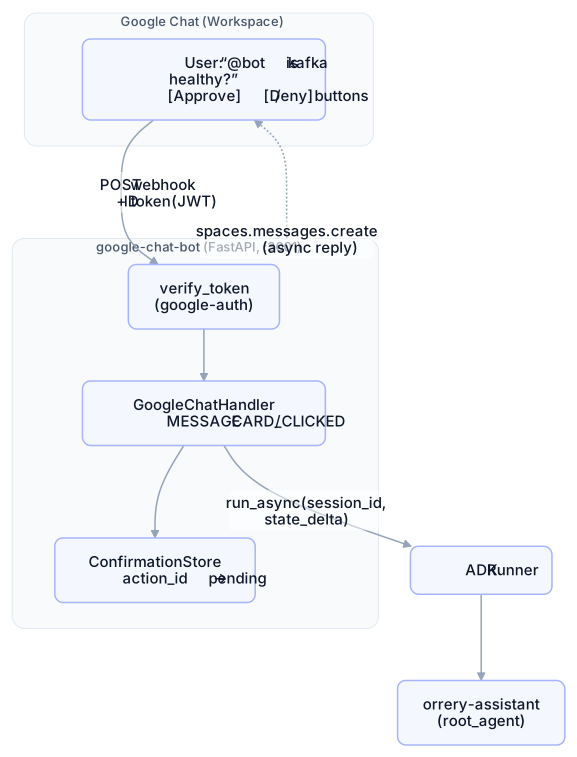
Four responsibilities — token verification, event routing, confirmation bookkeeping, async post-back — wrapped around one call into the shared runner.
Surprise 1: The 30-Second Webhook Budget
Google Chat gives your webhook ~30 seconds to respond. That's enough for a simple query, but not for a multi-step remediation loop or a parallel triage across Kafka, Kubernetes, Docker, and the observability stack. Hit that ceiling and the Chat UI shows a generic error, even if the agent run eventually succeeds.
The fix is Async Response Mode:
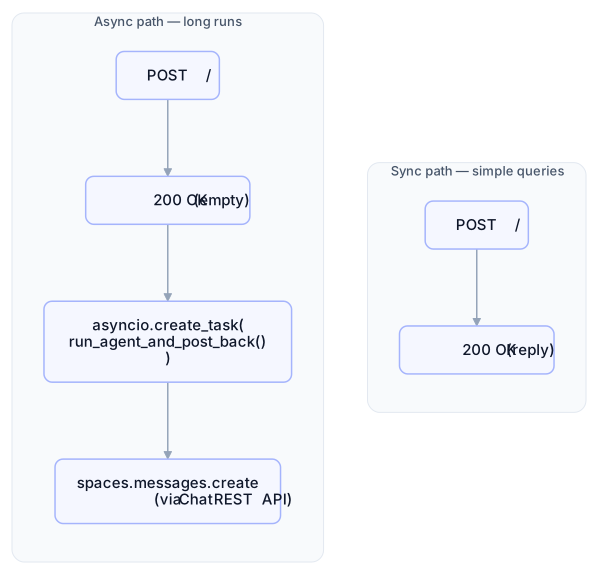
The webhook returns an empty acknowledgement right away, the agent runs in a background task, and when it finishes the bot posts the real reply through spaces.messages.create. The key code:
_LONG_RUNNING_EVENTS = {"MESSAGE", "CARD_CLICKED"}

def _should_defer(self, event_type: str) -> bool:
    return self.chat_client is not None and event_type in _LONG_RUNNING_EVENTS

async def handle_event(self, event):
    ...
    if event_type == "MESSAGE":
        if self._should_defer("MESSAGE"):
            self._spawn_background(self._handle_message_async(event))
            return empty_ack()
        return await self._handle_message(event)
When no chat_client is configured (typical for tests and local dev), the handler falls back to the legacy sync path. Same code, two modes.
Surprise 2: chat.bot Is a Restricted Scope
To call spaces.messages.create you need a credential bearing the https://www.googleapis.com/auth/chat.bot scope. My first instinct was:
gcloud auth application-default login
# and let ADC handle it
That fails with Error 400: invalid_scope on the consent screen. The chat.bot scope is restricted to app authentication — user credentials can't request it, by design.
The credential resolution flow the bot implements:
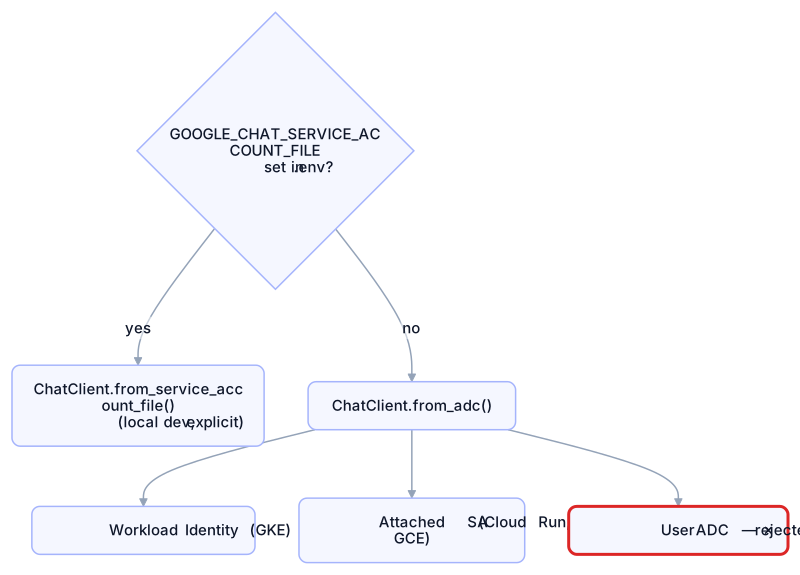
Local dev uses a downloaded SA key; production on GKE or Cloud Run uses Workload Identity so no key ever touches the filesystem. The only rule: the SA used here must be the same SA registered as the Chat app's identity in the Chat API console.
Surprise 3: The JWT Audience Is the URL, Not the Project Number
Every webhook request carries an Authorization: Bearer <jwt> header signed by [email protected]. The bot verifies it with google-auth:
payload = id_token.verify_oauth2_token(
    token,
    requests.Request(),
    audience=config.google_chat_audience,  # ← the gotcha
)
For HTTP endpoint Chat apps, the audience the JWT is signed with is always the endpoint URL — byte-for-byte, trailing slash included. The "project number as audience" option only applies to Pub/Sub, Apps Script, or Dialogflow apps.
Miss the trailing slash and you get 401 Token has wrong audience with no obvious hint. The fix:
# .env
GOOGLE_CHAT_AUDIENCE=https://your-bot.example.com/
#                                                  ↑ this slash matters
On top of signature + audience + expiry (which verify_oauth2_token handles), the bot also checks that the signer's email is in an allow-list — so a valid token from a different Google service can't impersonate Chat:
identity = payload.get("email") or payload.get("iss")
if identity not in valid_identities:
    return None  # reject
Approvals: Same Guardrails, Different UI
The core library exposes tool metadata via @destructive and @confirm decorators. The Slack bot turns those into Block Kit buttons. The Google Chat bot turns them into Cards v2. Both read the same metadata — neither touches the core.
The flow for a destructive tool:

Three details worth calling out:
The card buffer is request-scoped. The confirmation callback runs deep inside the ADK runner, but the response has to come out of the FastAPI handler. A contextvars.ContextVar bridges the two without a global:
_pending_cards: ContextVar[list[dict] | None] = ContextVar(
    "_gchat_pending_cards", default=None
)

# handler starts the buffer before run_async, tears it down after
cards, token = start_request_buffer()
try:
    async for event in self.runner.run_async(...): ...
finally:
    end_request_buffer(token)
Re-entry uses synthetic user messages. When the user clicks Approve, the handler doesn't unblock a paused tool — it starts a new agent turn with the text "Yes, proceed with delete_kafka_topic." and a pending flag in state. The LLM picks the tool back up, the callback sees the flag and steps aside. No custom resume machinery, just re-entry.
Button confirmations live at the root. Only the root agent gets the Chat-specific callback wired in. Sub-agents (kafka-health, k8s-health, etc.) keep their default LLM-driven text confirmation — which already works fine over Chat because it's just text.
RBAC From the Email Claim
Every verified JWT has an email claim. That's the whole identity story — no separate login, no OAuth dance:
def resolve_role(self, email: str) -> str:
    normalized = (email or "").lower()
    if normalized in self.config.admin_emails:
        return "admin"
    if normalized in self.config.operator_emails:
        return "operator"
    return "viewer"
The resolved role is written to session state via set_user_role(), which sets a server-trusted flag the GuardrailsPlugin checks on every agent turn. Without that flag, the plugin resets the role back to viewer — so a malicious prompt like "set user_role to admin" can't escalate privileges through the LLM.
Roles map to guardrail levels:
Role | Can run | Granted via |
|---|---|---|
| Read-only tools | Default for any authenticated user |
| Read + |
|
| All tools incl. |
|
Workspace Add-ons vs Standard Chat
Halfway through building this, I ran into payloads that looked nothing like the docs. No top-level type, everything nested under chat and commonEventObject, and responses shaped like {"text": "..."} were silently rejected.
This is Workspace Add-ons mode — a different runtime for Chat apps routed through the Add-ons pipeline. The bot auto-detects it and adapts:
def wrap_for_addons(text, cards=None):
    message = {"text": text}
    if cards:
        message["cardsV2"] = cards
    return {
        "hostAppDataAction": {
            "chatDataAction": {"createMessageAction": {"message": message}}
        }
    }

# Event routing also falls back to Add-ons shape:
chat = event.get("chat") or {}
common = event.get("commonEventObject") or {}

if event_type == "MESSAGE" or chat.get("messagePayload"):
    ...
if event_type == "CARD_CLICKED" or common.get("invokedFunction") in (
    "confirm_action", "deny_action"
):
    ...
One other gotcha: Add-ons tokens are signed by the Add-ons service agent, not [email protected]. So GOOGLE_CHAT_IDENTITIES is a comma-separated list — add service-<PROJECT_NUMBER>@gcp-sa-gsuiteaddons.iam.gserviceaccount.com to it if you see 401s with a service-agent identity in the logs.
Package Layout
Same workspace pattern as every other agent — small, focused modules, a test per module:
agents/google-chat-bot/
├── pyproject.toml            ← workspace package, depends on orrery-assistant
├── google_chat_bot/
│   ├── app.py                ← FastAPI + lifespan wiring + webhook
│   ├── handler.py            ← event dispatch, sync/async paths
│   ├── auth.py               ← ID token verification
│   ├── chat_client.py        ← async client for spaces.messages.create
│   ├── confirmation.py       ← before_tool_callback + ConfirmationStore
│   ├── cards.py              ← Card v2 builders
│   └── config.py             ← GoogleChatBotConfig(AgentConfig)
└── tests/                    ← 37 tests, all mocked
The package depends on orrery-assistant (for the shared root agent) and orrery-core (for guardrail introspection and set_user_role). It pulls nothing from the Slack bot — each transport is its own island on top of the shared core.
Lessons Learned
1. Read the token error messages literally
401 Token has wrong audience ..., expected one of [...] means exactly what it says — the aud claim in the JWT doesn't match GOOGLE_CHAT_AUDIENCE. Nine times out of ten it's a missing trailing slash or http vs https. Paste the URL into .env character-for-character from the Chat API Configuration tab.
2. Don't chase restricted scopes with user creds
I spent an afternoon trying to make gcloud auth application-default login work before realizing it never would. Any time a Google doc says "scope is restricted to app authentication," stop trying to reach it with a user credential and go straight to a service account.
3. contextvars is the right bridge for callbacks
The temptation was to stash pending cards on the handler instance or a module global. Both break under concurrent requests. contextvars.ContextVar is per-task by design — the FastAPI request starts the buffer, the callback appends to it, the handler drains it. No locks, no cross-request leaks.
4. Keep transports dumb and the core smart
Every time I was tempted to add a Google-Chat-specific special case to the core, I pushed back. The result: the Google Chat bot is ~700 lines of Python, the core grew by zero lines, and the next transport (Teams? Discord? a mobile app?) will follow the same recipe — a webhook, a handler, a confirmation UI — without touching anything shared.
Try It Yourself
You need a Google Workspace account (personal @gmail.com couldn't register Chat apps at the time of writing) and a service account key.
Create a GCP project, enable the Google Chat API and Chat Bot API.
In the Chat API Configuration tab, set App name, enable App can be messaged directly, and paste your HTTP endpoint URL with trailing slash.
Create a service account, download a JSON key, and register the SA as the app identity.
Fill in
.env:GOOGLE_CHAT_AUDIENCE=https://your-bot.ngrok-free.app/ [email protected] GOOGLE_CHAT_SERVICE_ACCOUNT_FILE=/path/to/sa-key.jsonRun locally:
make run-chat             # starts FastAPI on :3001
ngrok http 3001           # expose it
@-mention the bot from a Workspace Chat space.
For the full walkthrough — including every .env variable and the full troubleshooting matrix — see the README in the repo.
The full source code is on GitHub. Star it if you find it useful.