Building AI Agents for DevOps Part 16: Streaming What the Agent Is Doing
Part 15 was about what the agent may do. This post is about something more visible: whether you can see it doing it. Until Orrery 0.6.0, asking for a health sweep meant watching a spinner. POST /chat...
Part 15 was about what the agent may do. This post is about something more visible: whether you can see it doing it.
Until Orrery 0.6.0, asking for a health sweep meant watching a spinner. POST /chat answered once the whole turn was over, and a sweep across five specialists takes about a minute. Slack showed nothing until the answer arrived. Nothing was broken, but a minute of silence from something allowed to touch production is hard to trust.
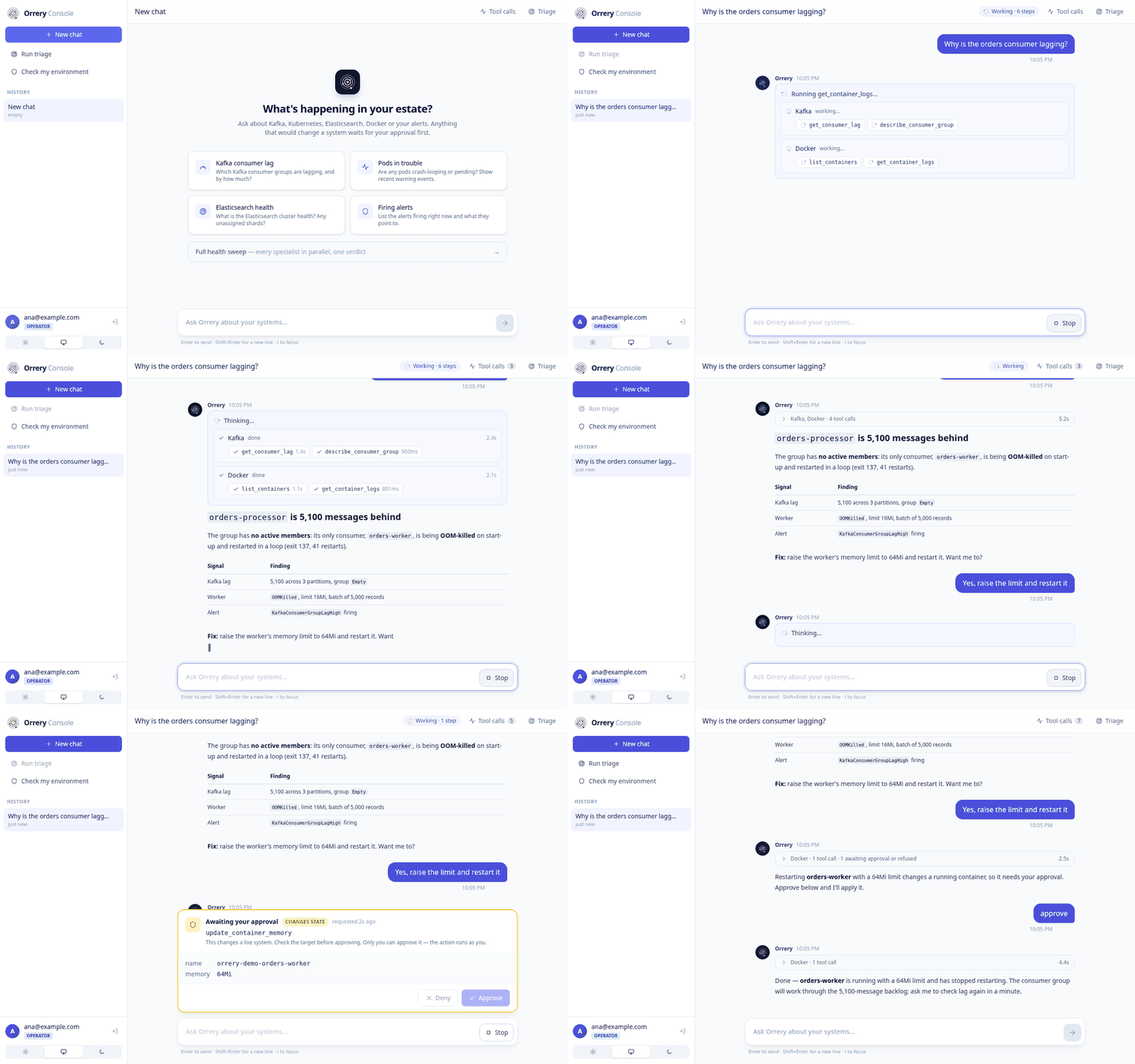
0.6.0 streams the answer as it is written, under a live trace of every specialist consulted and every tool it runs. The trace is the same in the web console, Slack and Google Chat. Here is the whole flow, against a real incident:
The Runner Can't See Inside a Specialist
Streaming text is easy: ADK marks partial events, and a transport forwards them. Streaming progress is harder, because of how Orrery is built. The chat root calls each specialist as an AgentTool, and an AgentTool runs its agent in a separate Runner and keeps that Runner's events to itself. From the root's event stream, a whole Kafka investigation looks like one tool call that returns a minute later.
Plugins are the way through. AgentTool hands the parent's plugin list to the sub-Runner, so a plugin sees every tool call at every depth. Orrery already relied on this once: ToolLedgerPlugin is how the Google Chat bot knows what a timed-out turn had already changed. ProgressPlugin uses the same path to report progress.
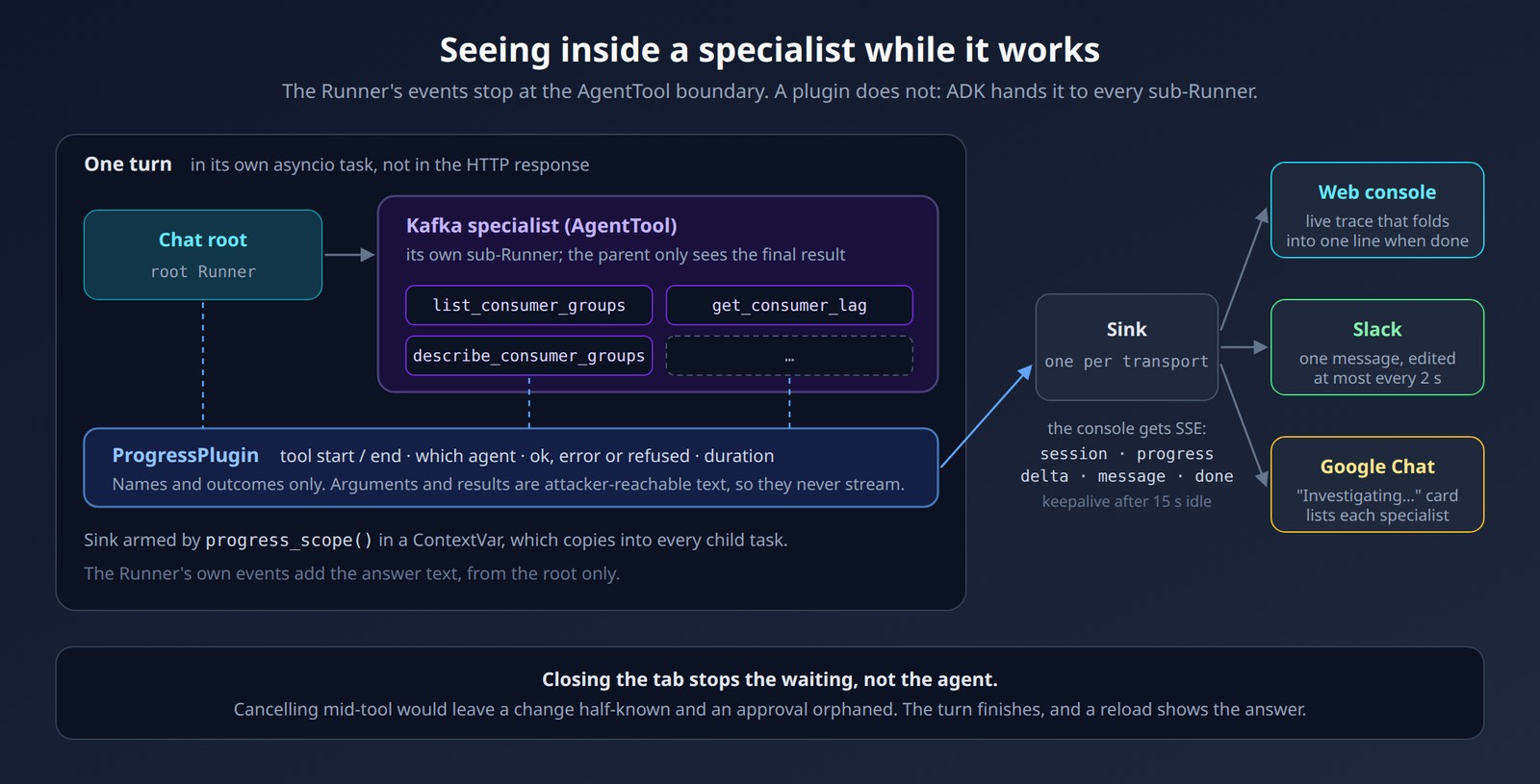
Three choices keep it safe and cheap:
Inert unless armed. A transport arms a sink with
progress_scope()for one turn. The sink lives in aContextVar, which Python copies into every child task, so it reaches the specialists' sub-Runners. It has to be entered inside the task that runs the agent; otherwise the copy is taken too early. Without a sink, every callback returns immediately.Registered ahead of the gates. ADK's before-tool chain stops at the first plugin that returns an answer. If the plugin came after RBAC, a refused call would never show as started, and the trace would hide exactly the calls you most want to see. Registered first, a refused call shows up with a lock icon.
Names and outcomes, never arguments. A step carries the agent, the tool, a status and a duration. Arguments and results stay out. They are attacker-reachable text (pod annotations, log lines), and they can contain credentials that the redaction plugin only scrubs from results. Streaming them to a browser would open a second output channel that nothing screens.
Closing the Tab Doesn't Stop the Agent
The new route is POST /chat/stream. It sends Server-Sent Events: the session id first, then progress and delta events, then the complete message, then done. EventSource can't be used, because it only sends GETs and can't set an Authorization header, so the console reads the stream from fetch() with a small parser.
The design decision that matters is where the turn runs. The obvious version runs the agent inside the response generator. When the client disconnects, Starlette cancels that generator, and the agent is cancelled with it, possibly in the middle of a tool call. For a read, nothing is lost. For a mutation, nobody knows whether the change went through, and a pending approval is left waiting for an answer that will never come.
So the turn runs in its own task, and the response only reads from a queue:
yield encode_event("session", {"session_id": session_id})

task = asyncio.create_task(run(), name=f"orrery-turn-{session_id}")
_running_turns.add(task)          # asyncio keeps only a weak reference
task.add_done_callback(_running_turns.discard)

while True:
    try:
        item = await asyncio.wait_for(queue.get(), timeout=keepalive_seconds)
    except TimeoutError:
        yield KEEPALIVE           # proxies cut idle connections
        continue
    if item is None:
        yield encode_event("done", {})
        return
    yield encode_event(*item)
The console's Stop button now means "stop waiting", not "stop the agent". The server finishes the turn and stores it, so reloading the conversation shows the answer. A few smaller details:
The final
messageevent is authoritative. The client replaces its accumulated deltas with it, so a dropped chunk can't corrupt the answer.The
errorevent carries a generic message. Exceptions can contain provider error bodies, hostnames and tool output, none of which belong in a browser. The traceback goes to the server log.Against a server without the stream route, the console falls back to
POST /chat.
One Trace, Three Surfaces
The plugin emits raw start and end steps. Grouping them into "this specialist ran these tools" lives in a shared module, orrery_core.serving.progress, and each surface renders the result in its own way:
Surface | How it shows progress | The constraint it works around |
|---|---|---|
Web console | A live trace above the answer that folds into one line when the turn ends | None: SSE delivers every step |
Slack | One status message in the thread, edited as work happens, then reduced to a one-line receipt |
|
Google Chat | The "Investigating…" card lists each specialist and its tool calls | The card used to go quiet as soon as work moved inside a specialist |
On Slack, everything is best-effort. A rate limit, a missing scope or a failed edit is logged and ignored, because progress must never cost an answer. A quick turn that uses no tools adds nothing to the thread. SLACK_PROGRESS_UPDATES=false turns the feature off.
The Console, Redesigned
Streaming changed what the console needed to be, so it was redesigned around it:
Answers render as full-width documents in a reading column, under the live trace.
The layout works on a phone: the history becomes a slide-out menu and the inspector a drawer.
A light, system or dark theme switch.
A welcome screen whose suggestions are symptoms ("Which consumer groups are lagging?"), because an operator usually arrives with one.
A clearer approval card that says how risky the action is and how old the request is.
A Demo That Breaks Something Real
A streaming trace is only convincing if the incident behind it is real. make demo creates one on the local Docker stack, with two faults that tell one story:
Kafka: a topic
orderswith 6,000 messages and a consumer group that committed only 900 of them, so it is 5,100 messages behind. kafka-exporter publishes the lag, and the newKafkaConsumerGroupLagHighalert fires about 30 seconds later.Docker: the worker that should consume them runs with a 16 MiB memory limit and a startup that needs more. It is really OOM-killed and restarted in a loop.
Nothing is mocked. Ask "why is the orders consumer lagging?" and the Kafka, observability and Docker specialists each find their part of the story, and the agent connects them. Then it proposes a fix and waits for approval. make demo-reset removes everything.
The GIF above comes from make demo-gif. It runs the real server, plugins and gates against a scripted model, so the recording is reproducible and costs no tokens. The live demo uses a real model, and its wording changes from run to run.
Running the demo also found a bug. On a machine where Postgres wasn't running, make demo crashed at startup. Sessions and memory follow the platform's database policy: fail fast, or fall back to memory when ORRERY_DB_ALLOW_INMEMORY_FALLBACK allows it. The new agent-catalog store (see Part 17) connected on its own and ignored the policy. The fix was one line. The lesson is the one from Part 15: a policy that every new store has to remember is a convention, and the demo was the first test that exercised it.
The Takeaway
The engineering here is small: a plugin, a queue, a task. What mattered was deciding what the stream must not do. It must not stop the turn when the client leaves. It must not hide refused calls. And it must not become a second, unscreened channel for tool output.
The full list is in the v0.6.0 release notes. To try it, clone the repository and run make demo.