Building AI Agents for DevOps Part 1: Why and How I Designed the Architecture
I spend a lot of my time doing the same DevOps tasks: checking if Kafka consumers are lagging, investigating pod crashes, looking at Prometheus alerts, reading logs. The same questions, the same...
Updated for Orrery 0.6.0 (October 2026). The core idea below still holds: one coordinator, many small specialists. Most of the names have changed.
devops-assistantis noworrery-assistant,ai_agents_coreisorrery_core, and the callbacks moved into plugins. There are now two roots: a chat agent for conversations and a fixed graph workflow for scheduled sweeps. The current architecture diagram and a recording of the console are at the end of this post.
I spend a lot of my time doing the same DevOps tasks: checking if Kafka consumers are lagging, investigating pod crashes, looking at Prometheus alerts, reading logs. The same questions, the same dashboards, the same CLI commands.
So I built a platform where AI agents do it for me. I ask a question in plain English, and the agent uses real tools — the same APIs I'd use — to find the answer.
This is Part 1 of a series covering how I built it. We'll start with why I chose this architecture and how the pieces fit together.
What It Actually Does
Here's a real interaction. I type:
"Is everything healthy?"The agent runs health checks across Kafka, Kubernetes, Docker, and Prometheus in parallel, summarizes the results, and saves a report:
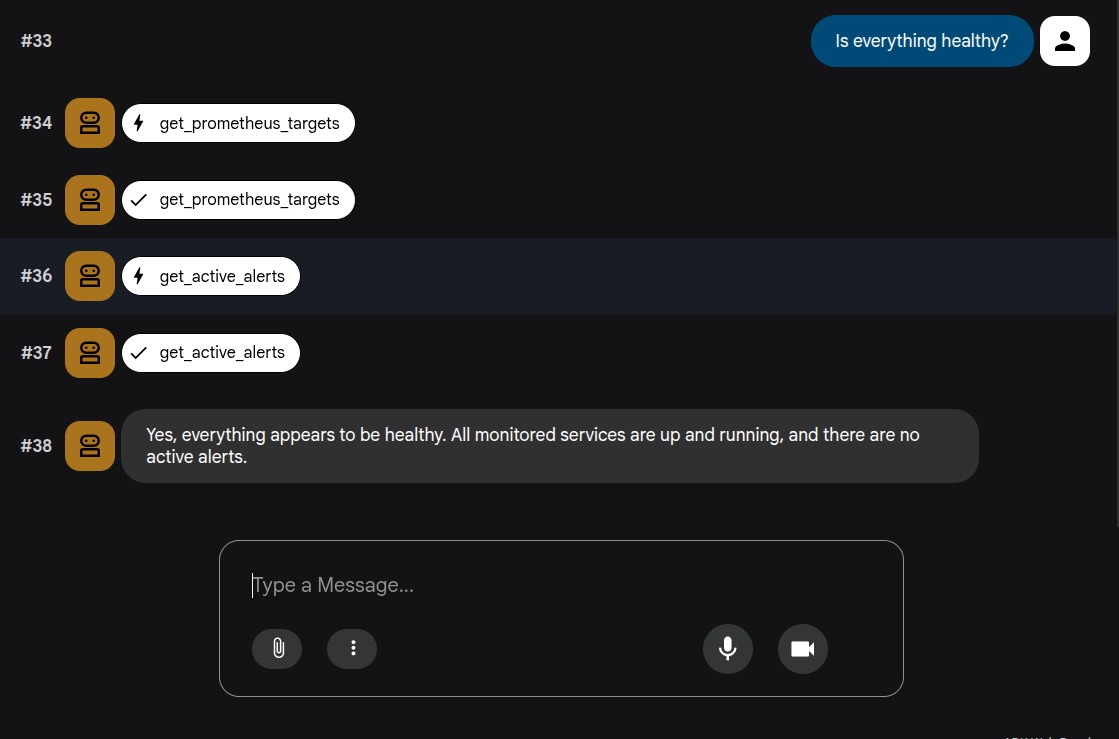
No dashboards to open, no CLI commands to remember. The agent calls the same APIs, but it does the tedious work of correlating results across systems.
The Tech Stack
Layer | Choice | Why |
|---|---|---|
Agent framework | Handles tool calling, multi-agent orchestration, session state | |
LLM | Gemini (via Vertex AI) | Good tool-calling support, fast, reasonable cost |
Language | Python (3.11 at the start, 3.14 today) | Best ecosystem for AI/agent tooling |
Package management | uv workspace | Fast, deterministic, monorepo-friendly |
Infrastructure | Docker Compose | One command to start everything locally |
Architecture: One Orchestrator, Many Specialists
The platform follows a simple pattern: a root orchestrator delegates to specialist agents, each with its own tools.
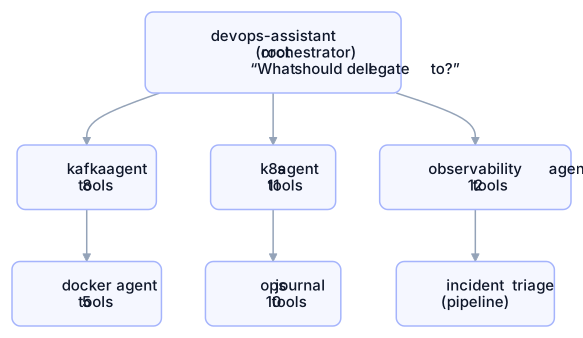
The orchestrator doesn't have tools of its own. Its job is to read the user's intent and route to the right specialist. If I ask about Kafka consumer lag, it delegates to the Kafka agent. If I say "check all systems", it triggers the incident triage pipeline.
Why This Design?
I could have built one big agent with 46 tools. Here's why I didn't:
1. LLMs pick better from smaller tool sets
Give a model 8 focused tools and it picks the right one almost every time. Give it 46 tools and it starts making mistakes — calling the wrong tool, mixing up parameters. Splitting by domain keeps each agent's context tight.
2. Agents are independently deployable
Each agent is its own Python package with its own pyproject.toml. I can run the Kafka agent standalone:
cd agents/kafka-health && uv run adk webOr compose them into the orchestrator. Same code, different deployment.
3. Easy to add new agents
Adding a new agent doesn't touch existing ones. Create a new directory, define tools, register it. The orchestrator's instruction tells the LLM when to use it.
The Workspace Layout
The whole project is a uv workspace a monorepo where each package can depend on the others:
ai-agents/
├── core/                    ← shared library (all agents depend on this)
│   └── ai_agents_core/
│       ├── base.py          ← agent factory functions
│       ├── config.py        ← typed configuration (pydantic-settings)
│       ├── guardrails.py    ← safety decorators
│       ├── audit.py         ← structured logging
│       └── error_handlers.py
│
├── agents/
│   ├── kafka-health/        ← standalone package
│   ├── k8s-health/          ← standalone package
│   ├── observability/       ← standalone package
│   ├── devops-assistant/    ← composes all agents
│   └── ops-journal/         ← session & state management
│
├── infra/                   ← Prometheus, Alertmanager configs
├── docker-compose.yml       ← full local stack
└── pyproject.toml           ← workspace root
The key insight: core/ contains everything that's not agent-specific. When I create a new agent, I get guardrails, audit logging, error handling, and typed config for free by importing from ai_agents_core.
What a Tool Looks Like
Tools are plain Python functions. No special base class, no registration — just a function that returns a dict:
def get_kafka_cluster_health() -> dict[str, Any]:
    """Checks the health of the Kafka cluster."""
    admin = _get_admin_client()
    try:
        metadata = admin.list_topics(timeout=10)
        brokers = metadata.brokers
        return {
            "status": "success",
            "health": "healthy" if len(brokers) > 0 else "unhealthy",
            "brokers_online": len(brokers),
            "brokers": [
                {"id": b.id, "host": b.host, "port": b.port}
                for b in brokers.values()
            ],
        }
    except KafkaException as e:
        return {"status": "error", "message": str(e)}
The LLM reads the function's docstring and type hints to understand what the tool does and when to call it. The return dict always has a status field so the LLM knows if the call worked.
What an Agent Looks Like
An agent is just a list of tools plus an instruction:
from ai_agents_core import (
    audit_logger, create_agent, graceful_tool_error,
    load_agent_env, require_confirmation,
)
from .tools import (
    get_kafka_cluster_health, list_kafka_topics,
    create_kafka_topic, delete_kafka_topic, ...
)

load_agent_env(__file__)

root_agent = create_agent(
    name="kafka_health_agent",
    description="Agent to monitor Kafka cluster health.",
    instruction="You are a Kafka monitoring specialist. ...",
    tools=[get_kafka_cluster_health, list_kafka_topics, ...],
    before_tool_callback=require_confirmation(),
    after_tool_callback=audit_logger(),
    on_tool_error_callback=graceful_tool_error(),
)
Notice the callbacks — this is how safety, logging, and error handling are plugged in without touching the tools themselves. Part 3 shows how RBAC plugs into this same callback pipeline, and Part 7 moves all of it into ADK plugins.
Where It Stands Today
Seventeen parts later, the platform is called Orrery. Each specialist is still a small agent with its own tools, but everything else on the original diagram has changed. Every surface goes through one gateway. Every call goes through one ordered chain of plugins. And two roots share the same specialists: a chat agent for conversations and a fixed graph workflow for scheduled sweeps.
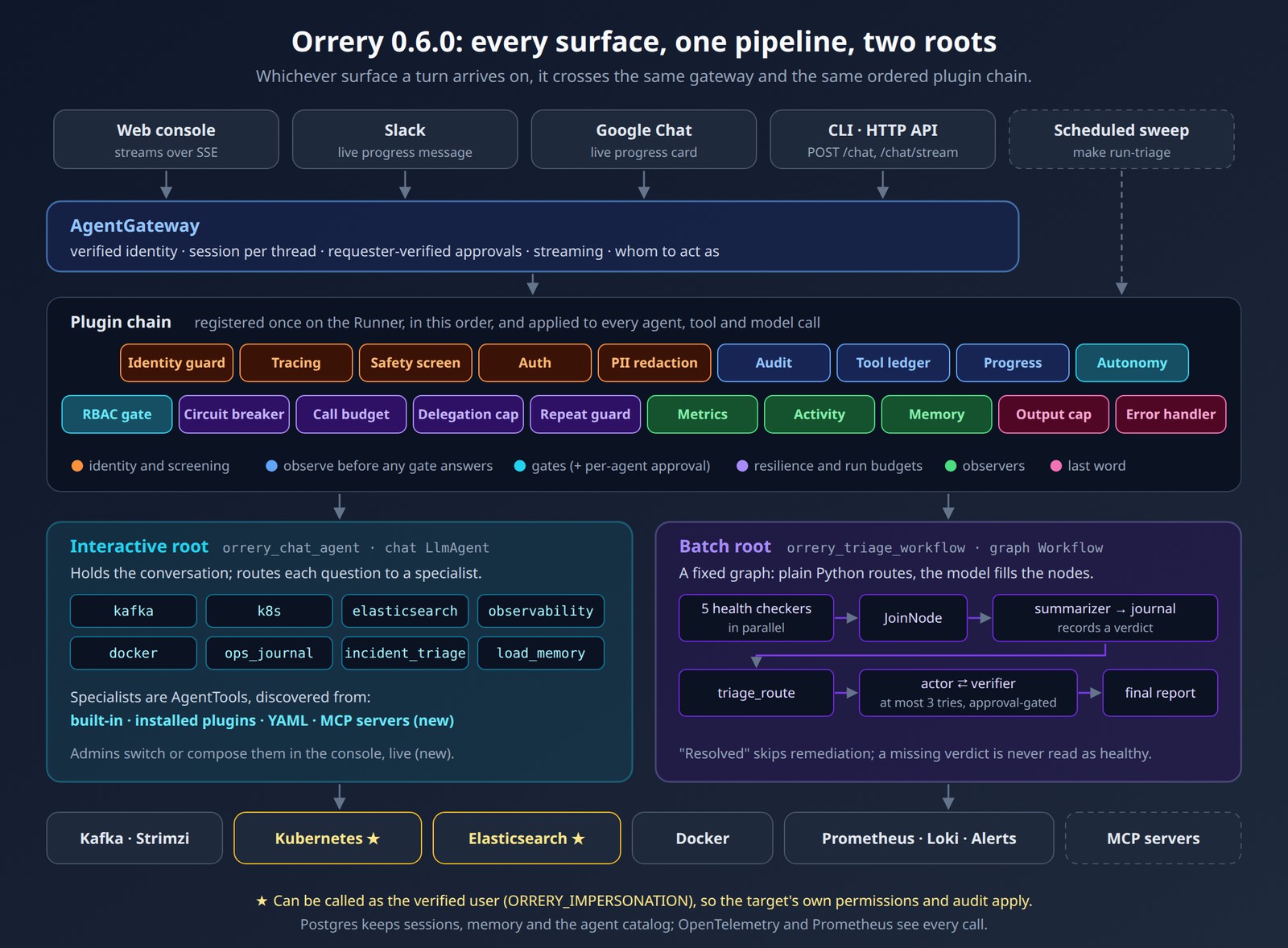
And this is what asking it a question looks like now, against a real incident that make demo creates on the local stack:
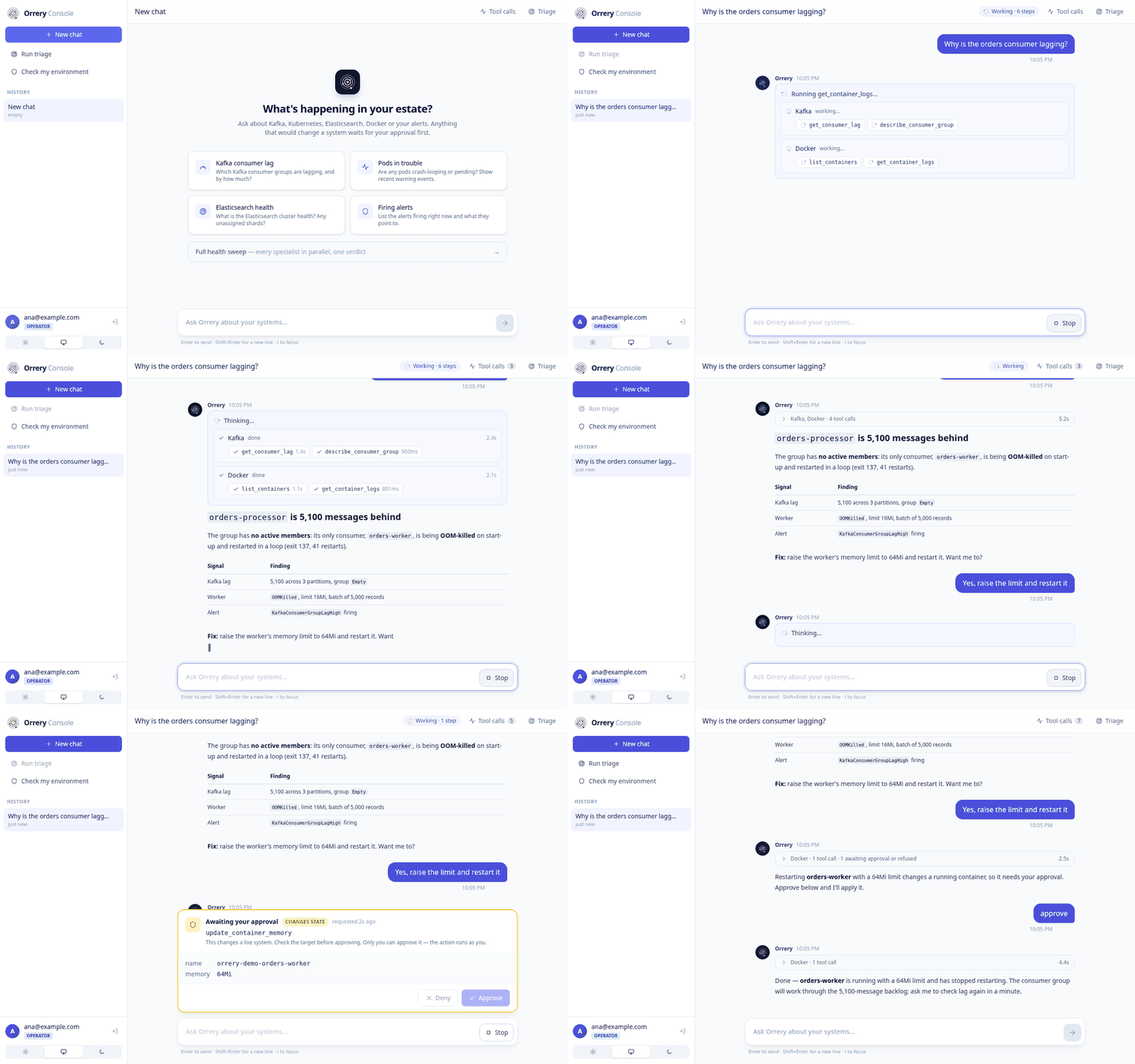
The parts in between explain how it got here. Part 16 covers the live trace, and Part 17 covers how the platform opened up without weakening the gates.
The full source code is on GitHub (the project has since been renamed Orrery). You can run the entire platform locally with make up && make run-dev.