How Search Works on Tirraflow: Postgres Full-Text Search, No Search Engine
Press Ctrl+K on Tirraflow and start typing: results appear as you type, ranked, with the matching words highlighted. There is no Elasticsearch or Algolia behind it. It is plain PostgreSQL, the...
Press Ctrl+K on Tirraflow and start typing: results appear as you type, ranked, with the matching words highlighted. There is no Elasticsearch or Algolia behind it. It is plain PostgreSQL, the database that already stores the posts, plus about a hundred lines of Go.
This is how it works, end to end.
1. Indexing: a trigger does all of it
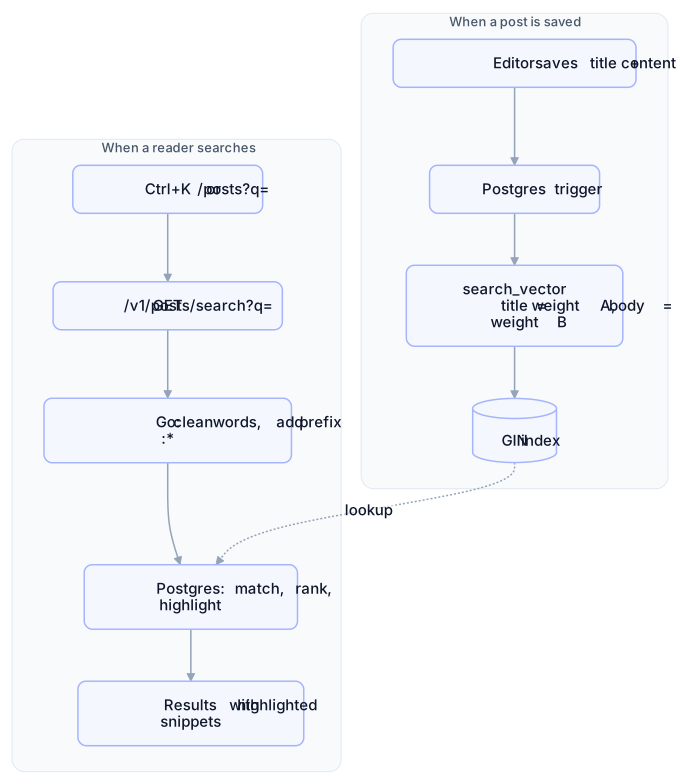
Each post has a search_vector column. The API never writes it. A database trigger rebuilds it whenever the title or the body changes:
CREATE TRIGGER posts_search_vector_update
BEFORE INSERT OR UPDATE OF title, content ON posts
FOR EACH ROW EXECUTE FUNCTION posts_search_vector_trigger();

-- the function sets:
NEW.search_vector :=
  setweight(to_tsvector('english', COALESCE(NEW.title, '')),   'A') ||
  setweight(to_tsvector('english', COALESCE(NEW.content, '')), 'B');
to_tsvector turns text into normalised words (lexemes) with their positions. It lowercases, drops stop words like "a" and "the", and stems each word to its root:
to_tsvector('english', 'Deploying Kubernetes clusters')
→ 'cluster':3 'deploy':1 'kubernet':2
Post bodies are stored as HTML, and that needs no special handling: Postgres's parser recognises tags and skips them, so the href of a link is not indexed as text.
to_tsvector('english',
  '<p>Running <a href="https://x.io">Kafka</a> on a <strong>VPS</strong></p>')
→ 'kafka':2 'run':1 'vps':5
setweight tags every title word A and every body word B, which matters for ranking later. A GIN index on the column is an inverted index: for each lexeme, the list of posts that contain it. A search looks up its words there instead of reading every post.
Because a trigger does the indexing, it cannot be skipped. Posts saved in the editor, bulk SQL edits and migrations all update the index the same way.
2. Querying: turning what you typed into a tsquery
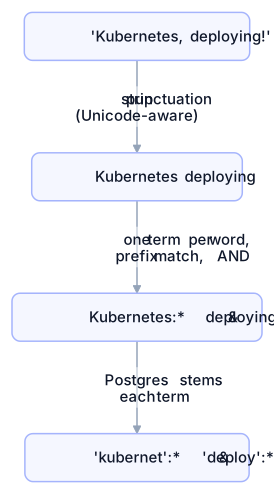
The Go side does one thing: it makes the input safe and search-as-you-type friendly.
var tsqueryUnsafe = regexp.MustCompile(`[^\p{L}\p{N}\s]`)

func sanitizeQuery(query string) string {
    words := strings.Fields(tsqueryUnsafe.ReplaceAllString(query, " "))
    terms := make([]string, 0, len(words))
    for _, w := range words {
        terms = append(terms, w+":*") // "kube" finds "Kubernetes"
    }
    return strings.Join(terms, " & ") // AND: every word must match
}
Punctuation is stripped because
&,|,!and:are operators intsquerysyntax. It uses\p{L}(any letter) and not\w, which in Go matches only ASCII: with\w, an Arabic or Cyrillic query came out empty.:*makes every word a prefix, so "kube" already finds "Kubernetes" while you are still typing.&means AND: every word you type narrows the results.
3. Matching, ranking and snippets in one query
SELECT p.id, p.title,
       ts_rank_cd(p.search_vector, q) AS rank,
       ts_headline('english', p.content, q,
         'StartSel=<mark>, StopSel=</mark>,
          MaxWords=35, MinWords=15, MaxFragments=2') AS headline
FROM posts p, to_tsquery('english', $1) q
WHERE p.search_vector @@ q          -- uses the GIN index
  AND p.status = 'published'
ORDER BY rank DESC, p.created_at DESC
LIMIT $2 OFFSET $3;@@is the match operator. Drafts never show up because of thestatusfilter.ts_rank_cdscores matches with the default weights, where A = 1.0 and B = 0.4. Searching "kube" on two test posts, one with Kubernetes in the title and one with it only in the body, scored 1.0 and 0.4. A title match wins.ts_headlinecuts up to two short fragments out of the body and wraps the matching words in<mark>. That is the highlighted snippet under each result.
The frontend puts that snippet in the page as HTML, so it passes through DOMPurify first. The markup is generated from post bodies, and nothing reaches innerHTML unsanitised.
4. Two ways in, one endpoint
Command palette ( | Posts page ( | |
|---|---|---|
Fires | 200 ms after you stop typing, from 2 characters | When you submit |
Shows | Top 6, plus "Search all posts for …" | Every result, 10 at a time, with infinite scroll |
Both call GET /v1/posts/search?q=…&page=…&page_size=…, and TanStack Query caches each query, so retyping a search you already ran costs nothing.
What it deliberately doesn't do
No typo tolerance. "kubrenetes" finds nothing. Stemming does forgive endings: "kubernets" still matches, because both words stem to
kubernet. If typos start to matter, thepg_trgmextension adds fuzzy matching on top without a new service.English stemming only. Other languages still match word for word, just without stemming.
Two queries per search, a
COUNTfor pagination and the page itself. At twenty posts that costs a millisecond.
That is the whole design: a trigger to index, a GIN index to look up, one SQL query to match, rank and highlight. For a blog-sized corpus, a separate search engine would be one more thing to run, secure and keep in sync, for results you couldn't tell apart. Try it: press Ctrl+K.