Building Tirraflow Part 6: An MCP Server for the Blog
More and more people read technical articles through an AI assistant: they ask a question and the assistant goes looking. Tirraflow already had /llms.txt and a Markdown version of every post for...
More and more people read technical articles through an AI assistant: they ask a question and the assistant goes looking. Tirraflow already had /llms.txt and a Markdown version of every post for crawlers. In October I added the interactive version: a Model Context Protocol server at https://tirraflow.com/mcp. Connect it to Claude, ChatGPT, Cursor or VS Code, and the assistant can search the articles, read one in full, and walk a series in order.
The design fits in one sentence: the reader's assistant does the thinking, and the site only serves what it already publishes. Tirraflow pays for no inference at all.
Availability. The server is live and open to everyone: no account, no key. Setup for each assistant is on the Use with AI page.
Small, Read-Only and Stateless
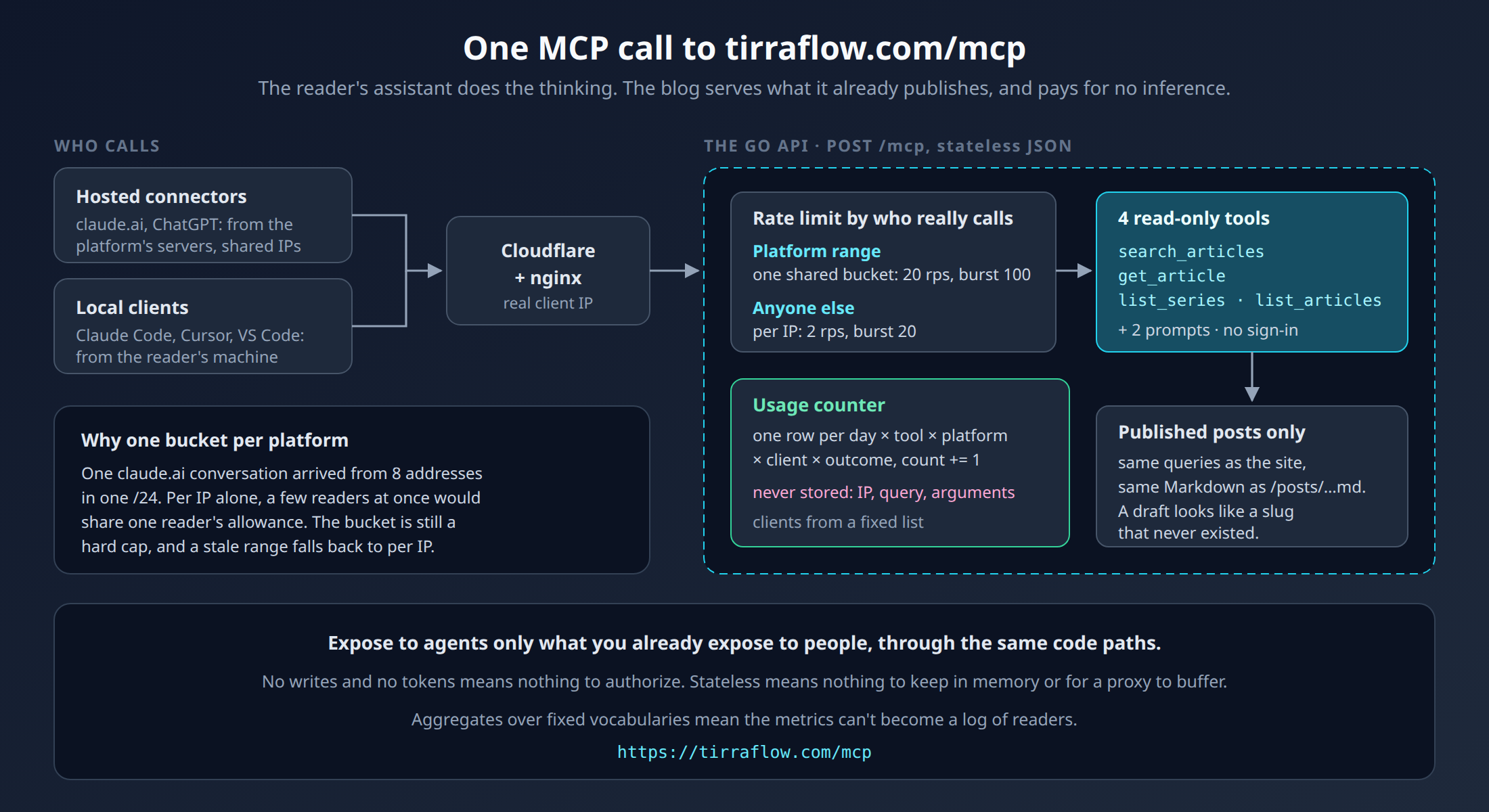
The server lives inside the existing Go API, using the official MCP Go SDK. It exposes four tools and two prompts:
search_articles: the site's own full-text search, with snippets, series position and difficulty;get_article: one article as Markdown, the same renderer as/posts/<slug>.md, with diagrams as mermaid source;list_seriesandlist_articles: the reading order and the catalogue;prompts
study_seriesandexplain_topic, which give an assistant a good starting instruction.
Three choices keep it cheap to run and hard to misuse:
Published posts only. A draft is treated exactly like a slug that never existed. The error message doesn't even say "draft". The server can only describe what the site already shows to everyone.
No sign-in, no writes. Every tool is a read of public data. There's nothing to authorize, so there's nothing to get wrong.
Stateless Streamable HTTP with plain JSON responses. Each POST is self-contained: no session kept in memory, no long-lived stream for nginx or Cloudflare to buffer. GET and DELETE return 405.
mcp.NewStreamableHTTPHandler(
    func(*http.Request) *mcp.Server { return server },
    &mcp.StreamableHTTPOptions{Stateless: true, JSONResponse: true},
)
Rate Limits When Everyone Shares One Address
The API already limits each IP address (2 requests per second, burst of 20). The first real test from claude.ai showed why that wasn't enough. A connector added in claude.ai or ChatGPT doesn't call from the reader's machine. It calls from the platform's servers. One claude.ai conversation arrived from eight addresses in the same /24. Under a per-IP limit alone, a handful of readers asking at the same moment would share one reader's allowance and start getting 429s.
So each platform's published address range shares one bigger bucket:
Anthropic's outbound range (
160.79.104.0/21) and OpenAI's published connector ranges each get 20 requests per second, burst 100;everyone else keeps the per-IP limit.
This is safe for three reasons. The platforms rate-limit their own users. Every tool here is a cheap read. And the bucket is still a hard cap: an address in the list can never get more than its whole platform's allowance. OpenAI's list is a snapshot embedded in the binary, refreshed with one make target. If it goes stale, a missing address just gets the per-IP limit: the safe direction.
Knowing It's Used, Without Knowing Who
A public endpoint you can't measure is a guess. A log of who asked what is a liability. The usage table sits between the two: one counter row per day × kind × name × subject × platform × client × outcome, incremented in place.
No IP addresses, no search queries, no prompt arguments.
The subject is only ever the slug of a published article that was returned (public by definition), or the client's self-reported name, cut to 40 characters.
The client is mapped to a fixed list (
claude.ai,chatgpt,claude-code,cursor,vscode, …). The one exception is the name a client reports when it connects, kept lowercased and cut to 40 characters. Mapping it onto the same fixed list is the next change.
The admin dashboard reads it as "which articles do assistants open, from which tools". That's enough to decide what to write next, and it holds no IP address, query or argument that could identify a reader.
Making It Findable
A server nobody knows about isn't used. The /ai page has copy-paste setup for Claude, Claude Code, VS Code and Cursor, the list of tools, and example questions. Every series page has a "Study it with your AI assistant" box, and every article ends with an "Ask your AI assistant about this article" box.
The Pattern
Expose to agents only what you already expose to people, through the same code paths.
Prefer stateless, read-only tools. Each one you don't add is one less thing to authorize.
Rate-limit by who really calls you: a platform's servers aren't one reader.
Count usage in aggregates, with fixed vocabularies, so the metrics can't become a log of people.
To try it, add https://tirraflow.com/mcp as a connector in your assistant and ask it to "study the Agents in the Open series with me".