Agents Acting for People Part 1: How OAuth Works for Agent Tools
An AI agent's tool makes a request to some system, and that request carries a credential. Whose credential is it? For most agents the honest answer is "the agent's own", which means every user...
Status, November 2026: written against Google ADK 2.13 and Orrery 0.20.0. Token exchange for MCP servers shipped in Orrery 0.7.0 and was hardened through 0.19.0.
An AI agent's tool makes a request to some system, and that request carries a credential. Whose credential is it? For most agents the honest answer is "the agent's own", which means every user borrows the same access. This part explains the three identities in every tool call, the four ways to give a tool a credential, and how OAuth 2.0 Token Exchange (RFC 8693) lets a tool act as the person who asked without ever handing that person's token to someone else.
Three Identities in Every Tool Call
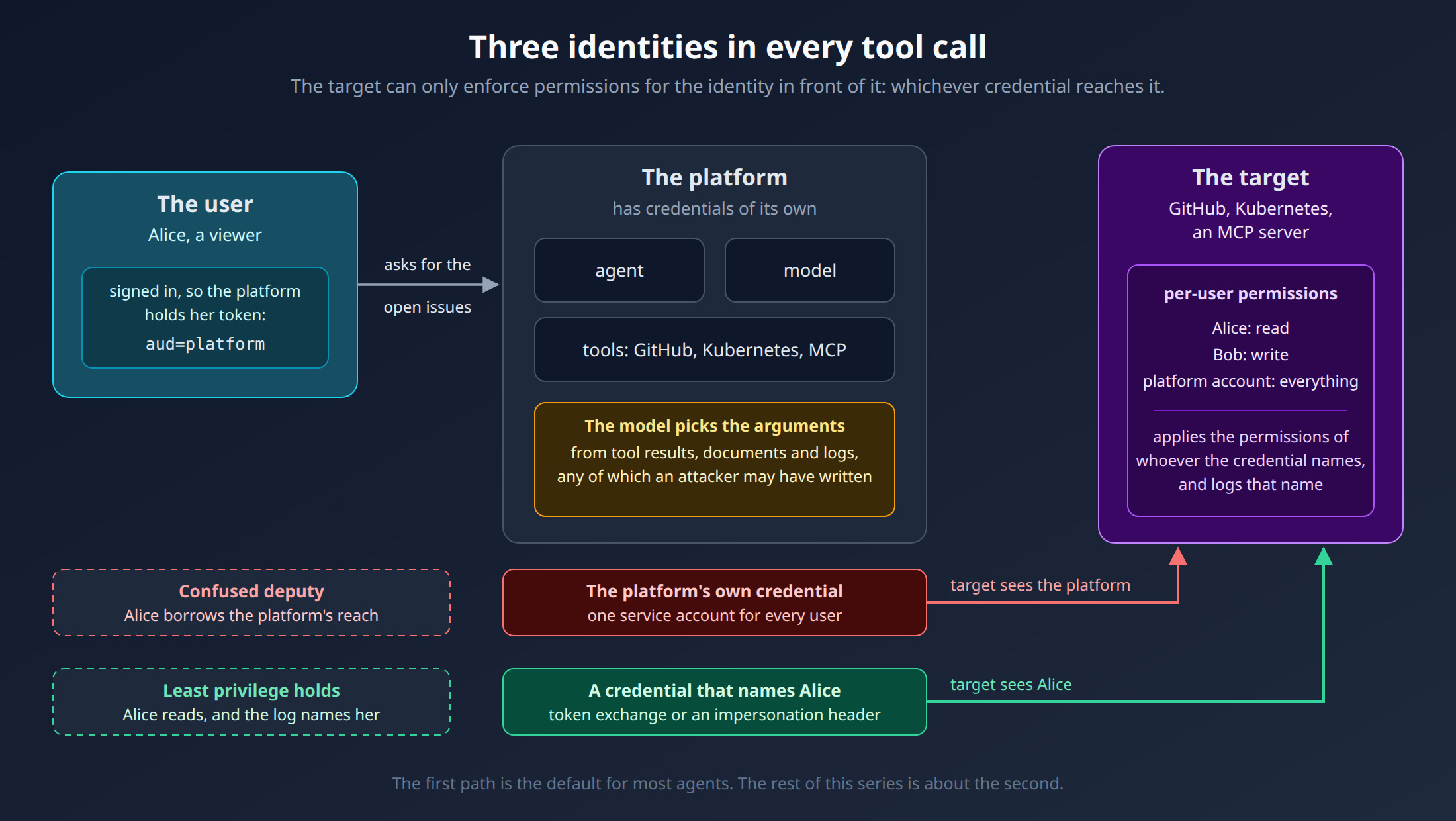
When Alice asks an agent "list the open issues on the payments repo", three parties are involved:
The user, Alice. She signed in, so the platform holds a token that proves who she is.
The platform: the agent runtime, its model, its tools. It has credentials of its own.
The target: GitHub, Kubernetes, an MCP server. It decides what the request may do, based on the credential it receives.
The target can only enforce its own permissions for the identity in front of it. If that identity is the platform, the target's careful per-user permissions apply to nobody. This is the confused deputy problem: a program with broad rights acts on behalf of someone with fewer, and the system it calls can't tell the difference.
With an agent the deputy is easier to confuse than usual, because the one choosing the arguments is a language model. It reads text from tool results, documents and logs, any of which an attacker might have written.
Option 1: The Platform's Service Account
The default. The tool reads one API key or one service account at startup and uses it for every call.
Easy. One secret, no identity provider involved.
Everyone gets the same reach. A viewer who asks gets what an admin gets. Your own role checks in front of the tool are the only thing between them, and the target's audit log names the service account, not the person.
This is fine for read-only, low-sensitivity data. For anything else it turns your agent into the most privileged user of every system it touches.
Option 2: Ask the User to Consent (ADK's Tool Auth)
Google ADK has built-in OAuth support for tools. A tool describes what it needs with an AuthConfig: an auth scheme (OAuth 2.0, OpenID Connect, API key) and the client's credentials. When it has no token yet, it asks for one:
async def list_issues(repo: str, tool_context: ToolContext) -> dict:
    credential = tool_context.get_auth_response(GITHUB_AUTH)
    if credential is None:
        # Pauses the tool: ADK emits an adk_request_credential call
        tool_context.request_credential(GITHUB_AUTH)
        return {"status": "pending", "message": "Waiting for GitHub sign-in"}
    return await github.issues(repo, token=credential.oauth2.access_token)
ADK turns the request into a special adk_request_credential function call. Your client app sees it, sends the user through the provider's consent screen, and answers the call with the same AuthConfig, its auth_response_uri filled in with the redirect it got back. ADK then exchanges the authorization code for tokens and runs the tool again. Without a credential service configured, the response lives only for that invocation, so the next one asks again. McpToolset takes the same auth_scheme and auth_credential parameters.
This is the right tool when the user is granting your agent access to their own account at a third party: their Google Drive, their GitHub. It is a poor fit for platform integrations:
You own the token store. Where the user's tokens end up depends on the credential service you choose. The
Runnerhas none by default, andadk webkeeps them in process memory. ADK'sSessionStateCredentialServicekeeps them in session state, and its own docstring warns that session-read endpoints return that state verbatim, with the access and refresh tokens in clear text. Samples that copy the token intotool_context.stateland in the same place.A consent screen per tool. Your SRE should not click "Allow" for Kubernetes, Kafka and Grafana separately, in the middle of an incident.
No built-in way to act as the signed-in user. ADK's OAuth2 exchanger handles the authorization-code and client-credentials grants, plus refresh and Google service accounts. None of them turns "Alice is signed in here" into "Alice, for that system". You would write that exchanger yourself.
Option 3: Impersonation Headers
Some systems let a trusted client say "act as this user". Kubernetes reads Impersonate-User and Impersonate-Group, and Elasticsearch reads es-security-runas-user. The platform authenticates as itself, names the user, and the target applies the user's permissions.
It works well where it exists, and Building AI Agents for DevOps Part 17 covers it. But most systems have no such header. A GitHub API, a Grafana instance or an MCP server takes a bearer token and nothing else.
Option 4: Token Exchange (RFC 8693)
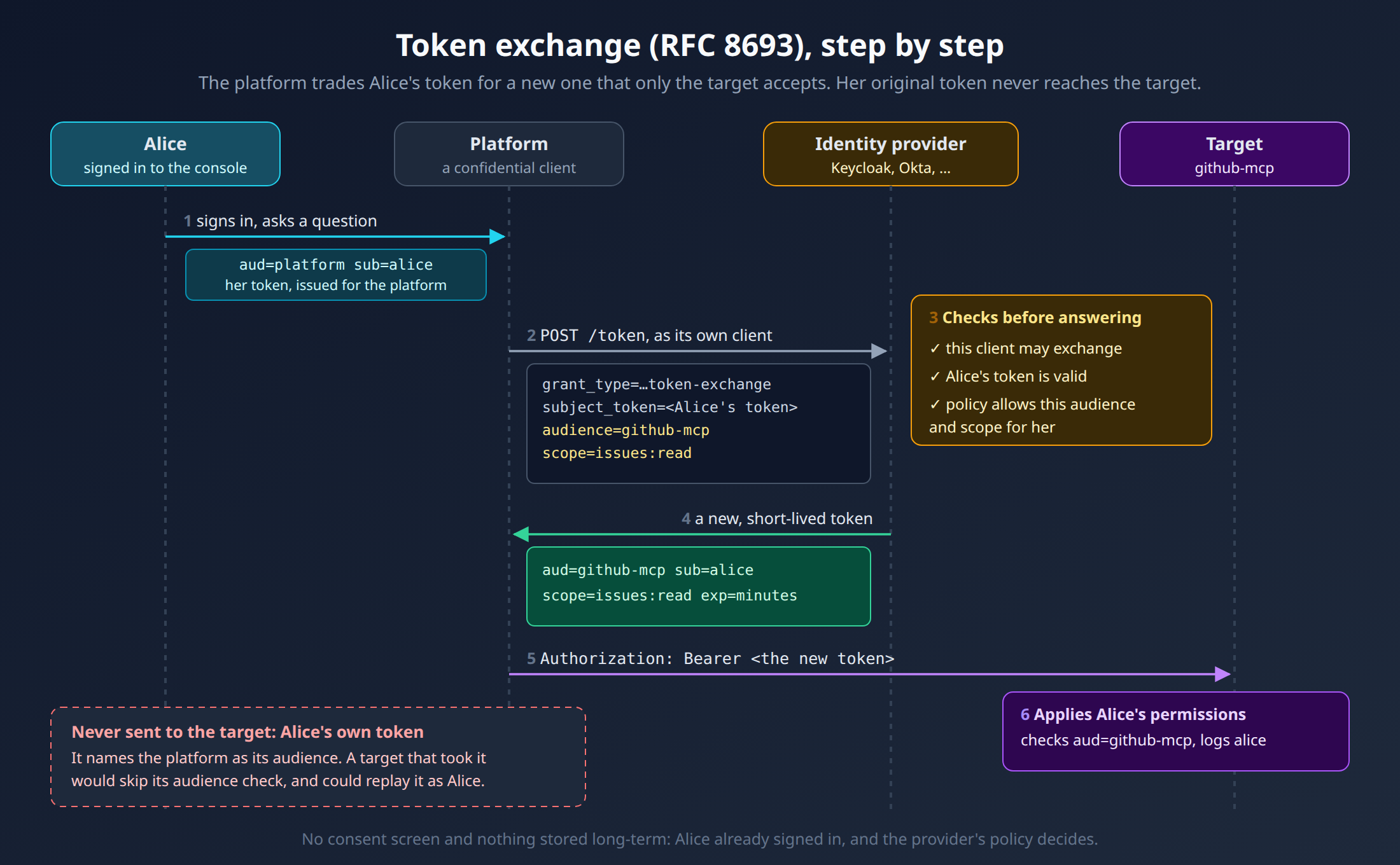
The tempting shortcut is to forward the user's own token. Don't. That token was issued for your platform: its audience (aud) names you. A target that accepted it would be ignoring the audience check, and anyone holding it, including the target, could replay it against your platform as the user.
OAuth 2.0 Token Exchange solves exactly this. The platform sends the user's token to the identity provider and asks for a different token for the same user, with the target's audience and a narrow scope:
POST /realms/ops/protocol/openid-connect/token
Authorization: Basic <platform client id:secret>
Content-Type: application/x-www-form-urlencoded

grant_type=urn:ietf:params:oauth:grant-type:token-exchange
&subject_token=<Alice's token for the platform>
&subject_token_type=urn:ietf:params:oauth:token-type:access_token
&requested_token_type=urn:ietf:params:oauth:token-type:access_token
&audience=github-mcp
&scope=issues:read
The provider checks three things before it answers: that the platform's client is allowed to exchange, that Alice's token is valid, and that this exchange is permitted by policy. The answer is a short-lived token that:
names Alice, so the target applies her permissions and logs her name;
carries the target's audience, so it is useless against your platform or any other system;
carries only the scope asked for, so a token for reading issues can't merge a pull request.
Nothing is stored long-term, and there is no consent screen: the user already signed in, and the identity provider's policy says which exchanges are allowed. Keycloak and Okta implement RFC 8693. Auth0 (Custom Token Exchange) and Entra ID (On-Behalf-Of, a different grant) offer equivalents.
Which One to Pick
Situation | Use |
|---|---|
The user's own account at a third party (their Drive, their inbox) | ADK tool auth, with a credential service whose storage you control |
A system with an "act as" header (Kubernetes, Elasticsearch) | Impersonation |
A system that takes a bearer token and trusts your identity provider | Token exchange |
Shared, read-only, nothing sensitive | The service account, and say so |
One rule holds in every row: when a tool is meant to act as a user and there is no user, refuse. A Slack message, a cron job or a service account calling your API holds no user token. Falling back to the service account in that case quietly turns "act as Alice" into "act as root".
What's Next
Token exchange is simple on a whiteboard. In an agent runtime it raises harder questions: where the user's token lives while the model is thinking, how to avoid an identity-provider round trip on every model step, what happens when the target rejects a token mid-session, and how to tell "Alice may not" apart from "the identity provider is down". Part 2 walks through how Orrery answers each one for MCP tools in ADK.