---
title: "Building Tirraflow Part 2: Keycloak Silent SSO in React, No Loading Screens"
url: "https://tirraflow.com/posts/keycloak-silent-sso-in-react-no-loading-screens-no-redirects"
author: "taoufiq"
published: "2026-03-12T20:11:49Z"
updated: "2026-09-25T21:01:46Z"
category: "Security"
difficulty: "intermediate"
series: "Building Tirraflow"
series_part: 2
series_url: "https://tirraflow.com/series/building-tirraflow"
tags: ["OAuth2", "Keycloak"]
---
# Building Tirraflow Part 2: Keycloak Silent SSO in React, No Loading Screens
In [Part 1](https://tirraflow.com/posts/how-i-built-tirraflow-a-full-stack-blog-platform-from-scratch), I mentioned that most Keycloak tutorials block the entire app with a "Loading authentication..." screen. That's a dealbreaker for a blog — most visitors are anonymous readers who don't care about auth.
So I made it non-blocking: the app renders instantly, Keycloak resolves in the background. Here's how.
---
## The Problem
The textbook approach gates your entire app behind Keycloak initialization:
```jsx
// Don't do this
if (!keycloakReady) return Loading authentication...
;
return ;
```
Every page load pays 200-500ms of blank screen. For a blog where 95% of visitors never log in, that's unacceptable.
---
## The Fix: Render First, Auth Later
### The Keycloak Singleton
```js
// src/api/keycloak.js
const keycloak = new Keycloak({
url: import.meta.env.VITE_KEYCLOAK_URL,
realm: import.meta.env.VITE_KEYCLOAK_REALM,
clientId: import.meta.env.VITE_KEYCLOAK_CLIENT_ID,
});
let initPromise = null;
export const init = () => {
if (!initPromise) {
initPromise = keycloak.init({
onLoad: 'check-sso',
silentCheckSsoRedirectUri:
window.location.origin + '/silent-check-sso.html',
pkceMethod: 'S256',
});
}
return initPromise;
};
```
Three things matter here:
- `check-sso` opens a hidden iframe instead of redirecting. The user stays on your page.
- `pkceMethod: 'S256'` — non-negotiable for public clients. Prevents authorization code interception.
- **Promise caching** — if `init()` gets called twice before resolving, both callers share one request.
### The Silent Check Page
The iframe redirects to this 3-line HTML file, which posts the tokens back to the parent window:
```html
```
### How It All Connects
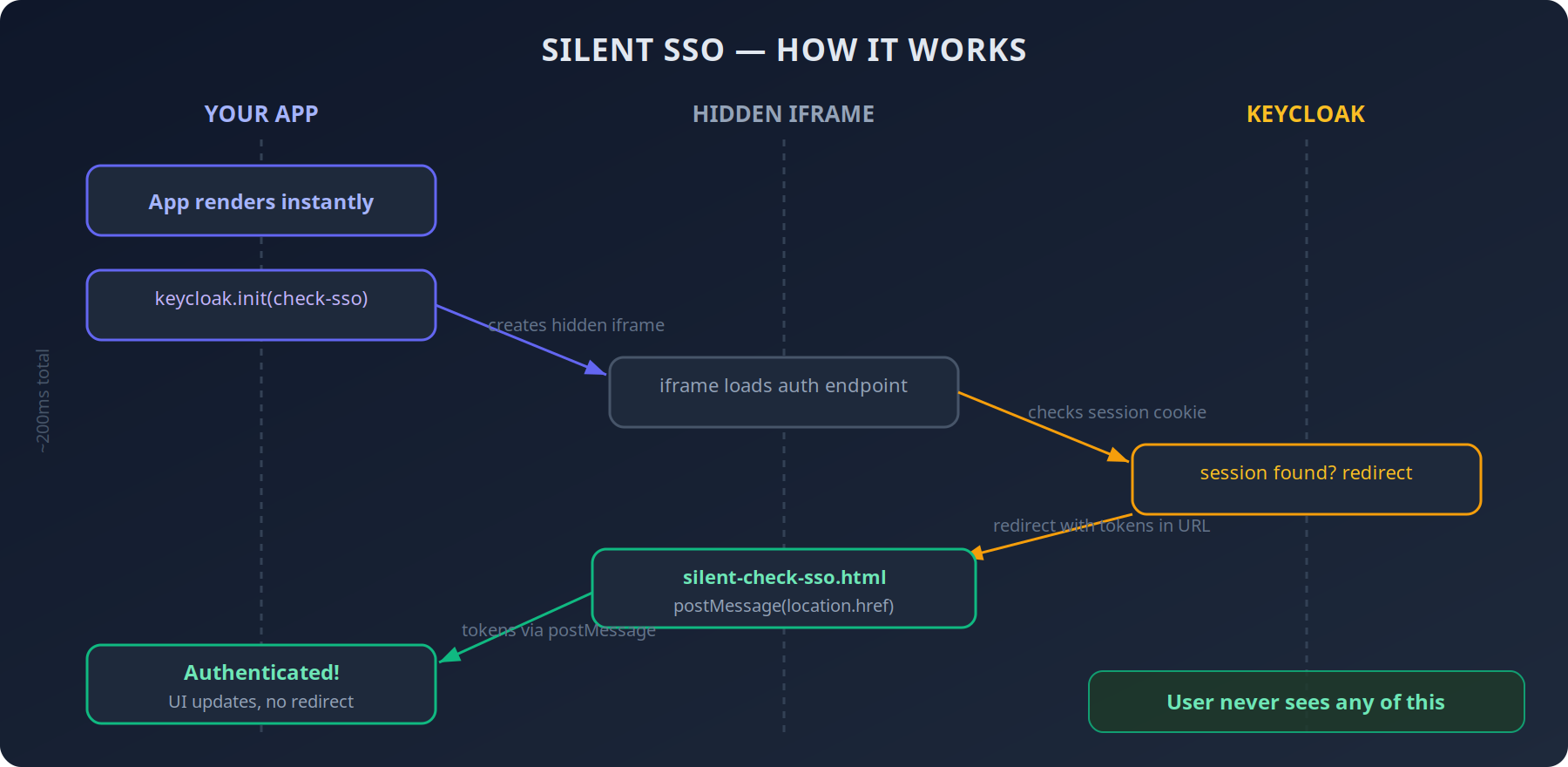
The entire flow completes in ~200ms. The user never sees any of it.
### The Non-Blocking Provider
```jsx
// src/contexts/AuthProvider.jsx (simplified)
function AuthProvider({ children }) {
const [initialized, setInitialized] = useState(false);
const [authenticated, setAuthenticated] = useState(false);
useEffect(() => {
init()
.then((auth) => {
setAuthenticated(auth);
if (auth) { /* extract user, roles */ }
setInitialized(true);
})
.catch(() => setInitialized(true)); // render anyway
}, []);
// No loading gate — children render immediately
return (
{children}
);
}
```
The key: **no** `if (!initialized) return `. Children render right away. When Keycloak finishes, auth-dependent components re-render. The homepage, articles, categories — they all load instantly.
For the rare page that needs auth (profile, dashboard), the `initialized` flag is available:
```jsx
if (!initialized) return ;
if (!authenticated) return ;
```
---
## Token Refresh: Two Layers
Tokens expire. If you don't handle this well, users get randomly logged out. I use two layers:
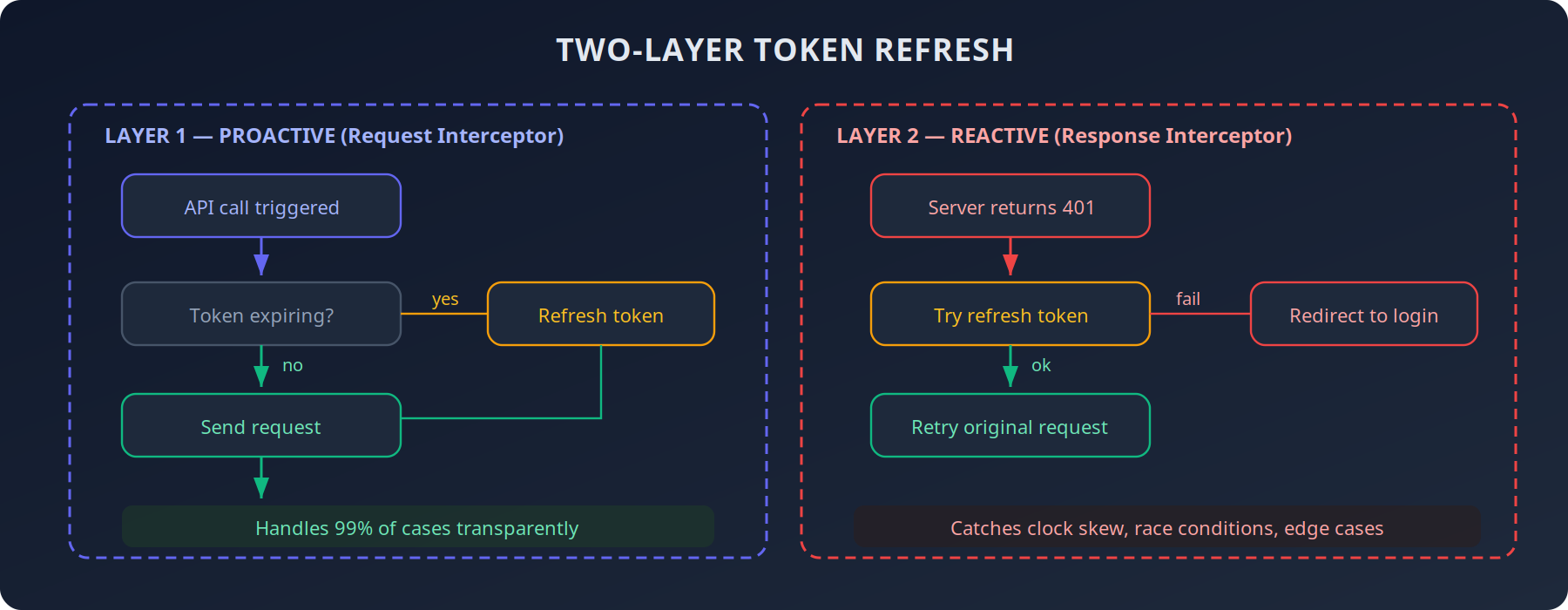
```js
// Request interceptor — proactive
client.interceptors.request.use(async (config) => {
if (keycloak.authenticated && keycloak.isTokenExpired()) {
await keycloak.updateToken(30);
}
if (keycloak.token) {
config.headers.Authorization = `Bearer ${keycloak.token}`;
}
return config;
});
// Response interceptor — reactive
client.interceptors.response.use(null, async (error) => {
if (error.response?.status === 401) {
try {
await keycloak.updateToken(5);
error.config.headers.Authorization = `Bearer ${keycloak.token}`;
return client.request(error.config);
} catch { keycloak.login(); }
}
return Promise.reject(error);
});
```
Layer 1 handles 99% of cases. Layer 2 catches edge cases — clock skew, tokens expiring mid-flight, race conditions. Individual API calls never need to handle 401s.
---
## Roles: Frontend Shows, Backend Enforces
Keycloak stores roles in two places in the JWT. You need both:
```js
const realmRoles = keycloak.tokenParsed?.realm_access?.roles || [];
const clientRoles =
keycloak.tokenParsed?.resource_access?.['tirraflow']?.roles || [];
const roles = [...new Set([...realmRoles, ...clientRoles])];
```
The AuthProvider computes permissions from these roles:
```jsx
const canEditPost = (post) =>
isAdmin || isEditor || post.author_id === user?.id;
```
Components just consume `useAuth()` and never think about role logic. But the frontend is purely cosmetic — the Go backend validates every request independently using the same JWT claims.
---
## The Nginx Header That Makes It All Work
Silent SSO relies on an iframe embedding Keycloak. Browsers block this by default. You need one CSP header on the Keycloak server:
```nginx
# On auth.tirraflow.com
add_header Content-Security-Policy
"frame-ancestors 'self' https://tirraflow.com" always;
```
Without this, the iframe silently fails. No error. No warning. Users just appear permanently logged out.
Also bump proxy buffers — Keycloak's redirect responses are large:
```nginx
proxy_buffer_size 128k;
proxy_buffers 4 256k;
```
Default Nginx buffers (4k) will truncate them, causing random 502s during login.
---
## Pitfalls I Hit
1. **Silent iframe failures are invisible.** Wrong CSP? The iframe just doesn't work. No console error. Check `frame-ancestors` first.
2. **Token refresh race conditions.** Three concurrent API calls with an expired token = three refresh attempts. `keycloak-js` handles this internally, but be careful wrapping it in custom logic.
3. **Clock skew.** Server clock 2 seconds ahead of client? Valid-looking tokens get rejected. The two-layer refresh catches this.
4. **PKCE is not optional.** No client secret in a SPA means anyone intercepting the auth code can exchange it for tokens. `pkceMethod: 'S256'` is one line. Just do it.
---
## The Result
- **Anonymous visitors** see the blog instantly. Zero auth overhead.
- **Returning users** get silently authenticated in ~200ms. Their avatar just appears in the navbar.
- **Token refresh** is transparent. No random logouts.
- **Roles** work identically on frontend and backend.
No custom auth system. No loading screens. Just careful orchestration.
---
## Update: Keycloak Moved Same-Origin
This post originally served Keycloak from `auth.tirraflow.com` and allowed the SPA to frame it with `frame-ancestors`. That worked, until browsers started partitioning cookies inside cross-site iframes. The silent-SSO iframe could no longer see Keycloak's session cookie, and the symptom was exactly the one this post set out to avoid: **logged out on every refresh**.
The fix was to stop being cross-site. Keycloak now lives under `/auth` on the same origin as the blog, so the iframe is first-party and shares the cookie jar:
```nginx
# nginx — Keycloak served same-origin
location /auth/ {
proxy_pass http://keycloak_upstream;
proxy_buffer_size 128k;
proxy_buffers 4 256k;
proxy_busy_buffers_size 256k;
}
```
Keycloak needs to know about the prefix in two places, and they must agree: `KC_HTTP_RELATIVE_PATH=/auth` and `KC_HOSTNAME=https://tirraflow.com/auth`. Keycloak builds issuer and redirect URLs from the hostname and does not append the relative path, so leaving `/auth` off the hostname produces tokens with the wrong issuer.
A second trap arrived with the Content-Security-Policy. The silent-check page used an inline `