---
title: "Building Tirraflow Part 4: CI/CD Auto-Deploy with GitHub Actions"
url: "https://tirraflow.com/posts/cicd-auto-deploy-with-github-actions-from-push-to-production"
author: "taoufiq"
published: "2026-03-14T14:21:39Z"
updated: "2026-09-25T21:01:46Z"
category: "DevOps & SRE"
difficulty: "intermediate"
series: "Building Tirraflow"
series_part: 4
series_url: "https://tirraflow.com/series/building-tirraflow"
tags: ["CI/CD"]
---
# Building Tirraflow Part 4: CI/CD Auto-Deploy with GitHub Actions
Every time I wanted to deploy a change to [Tirraflow](https://tirraflow.com), I'd SSH into the VPS, pull the latest code, rebuild containers, and restart services. Three repos, same ritual every time:
```bash
ssh deploy@my-server
cd ~/app/frontend && git pull
cd ~/app/deploy && docker compose -f docker-compose.prod.yml build frontend
docker compose -f docker-compose.prod.yml up -d frontend
```
It worked. But it was tedious, error-prone, and easy to forget a step. So I automated it — GitHub Actions now SSHs into the VPS and does the exact same thing, triggered by a merge to `main`.
---
## The Setup
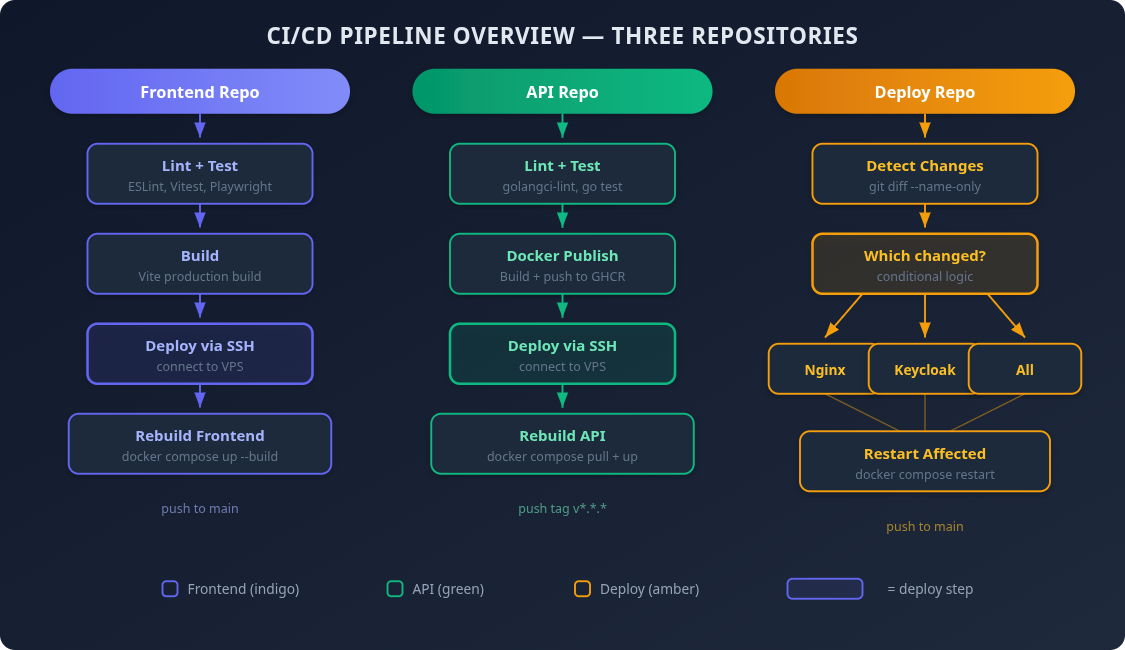
Tirraflow is split across three GitHub repositories:
| Repo | Contains | Deploy action |
| --- | --- | --- |
| **frontend** | React SPA (Vite + Tailwind) | Rebuild frontend container |
| **api** | Go/Gin API | Rebuild API container |
| **deploy** | docker-compose, Nginx configs, Keycloak themes | Restart affected services |
Each repo already had CI pipelines — lint, tests, builds. The goal was to add a `deploy` job at the end that only runs when code lands on `main`.
---
## The Approach: SSH from GitHub Actions
I considered a few options:
- **Watchtower** — auto-pulls new Docker images. Simple, but no control over timing or rollback.
- **Webhook listener on the VPS** — a small HTTP server that triggers deploys. More moving parts to maintain.
- **SSH from GitHub Actions** — runs the same commands I'd type manually. No extra infrastructure.
SSH won because it's the simplest thing that works. The VPS already accepts SSH. GitHub Actions already runs after tests pass. I just needed to connect the two.
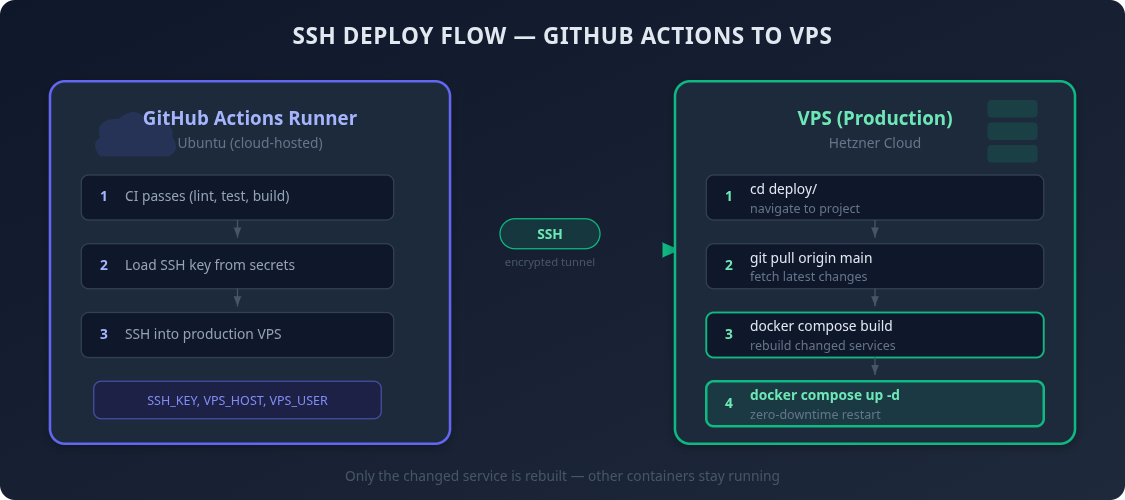
The tool for this is `appleboy/ssh-action` — a GitHub Action that SSHs into a remote server and runs a script. Battle-tested, widely used, minimal configuration.
---
## Setting Up SSH Access
GitHub Actions needs to authenticate with the VPS. The flow:
1. **Generate an SSH key pair** on the VPS (as the deploy user):
```bash
ssh-keygen -t rsa -b 4096
```
2. **Authorize the public key** so the server accepts connections:
```bash
cat ~/.ssh/id_rsa.pub >> ~/.ssh/authorized_keys
```
3. **Add the private key to GitHub Secrets** — this is what GitHub Actions uses to prove its identity.
Four secrets, configured in each repository (or at the org level to share them):
| Secret | Value |
| --- | --- |
| `VPS_HOST` | Server IP address |
| `VPS_USER` | Deploy username |
| `VPS_SSH_KEY` | Contents of the private key |
| `VPS_PORT` | SSH port (usually `22`) |
**Tip:** If you have multiple repos under the same GitHub org, set these as [organization secrets](https://docs.github.com/en/actions/how-tos/write-workflows/choose-what-workflows-do/use-secrets). Configure once, available everywhere.
---
## Frontend Pipeline
The frontend CI already runs lint, unit tests, E2E tests (Playwright), and a production build. The deploy job chains after all of that:
```yaml
# .github/workflows/ci.yml
name: CI
on:
push:
branches: [main]
paths-ignore:
- '*.md'
- 'docs/**'
- 'LICENSE'
- '.gitignore'
pull_request:
branches: [main]
paths-ignore:
- '*.md'
- 'docs/**'
- 'LICENSE'
- '.gitignore'
jobs:
ci:
name: QA & Tests
runs-on: ubuntu-latest
steps:
- uses: actions/checkout@v4
- uses: actions/setup-node@v4
with:
node-version: 22
cache: npm
- run: npm ci
- run: npm run lint
- run: npm run test:run
- run: npx playwright install chromium --with-deps
- run: npm run test:e2e
- run: npm run build
deploy:
name: Deploy to Production
runs-on: ubuntu-latest
needs: ci
if: github.event_name == 'push' && github.ref == 'refs/heads/main'
steps:
- name: Deploy via SSH
uses: appleboy/ssh-action@v1
with:
host: ${{ secrets.VPS_HOST }}
username: ${{ secrets.VPS_USER }}
key: ${{ secrets.VPS_SSH_KEY }}
port: ${{ secrets.VPS_PORT }}
script: |
cd ~/app/frontend && git pull origin main
cd ~/app/deploy && docker compose -f docker-compose.prod.yml build frontend
docker compose -f docker-compose.prod.yml up -d frontend
```
Key details:
- `needs: ci` — deploy only runs after all tests pass. A broken build never reaches production.
- `if: github.event_name == 'push' && github.ref == 'refs/heads/main'` — deploy only on merges to main, never on PRs. PR builds still run the full test suite, they just don't deploy.
- `paths-ignore` — if you only update the README, nothing runs at all. No point linting and deploying for a typo fix in documentation.
The deploy script does exactly what I used to do manually: pull the latest code, rebuild the Docker image (which runs `npm run build` inside a multi-stage Dockerfile), and restart the container.
---
## API Pipeline
The API pipeline is similar but has an extra step — it builds and publishes a Docker image to GitHub Container Registry (ghcr.io) before deploying:
```yaml
jobs:
qa:
name: QA & Tests
# ... lint, vet, unit tests, integration tests, build
docker:
name: Docker Build & Publish
needs: qa
# ... build image, push to ghcr.io, sign with cosign
deploy:
name: Deploy to Production
needs: docker
runs-on: ubuntu-latest
if: github.event_name == 'push' && github.ref == 'refs/heads/main'
steps:
- name: Deploy to VPS
uses: appleboy/ssh-action@v1
with:
host: ${{ secrets.VPS_HOST }}
username: ${{ secrets.VPS_USER }}
key: ${{ secrets.VPS_SSH_KEY }}
port: ${{ secrets.VPS_PORT }}
script: |
cd ~/app/api && git pull origin main
cd ~/app/deploy && docker compose -f docker-compose.prod.yml build api
docker compose -f docker-compose.prod.yml up -d api
```
The chain is: **QA passes → Docker image published → Deploy to VPS**. Three gates before anything touches production.
The API CI also runs on tags (`v*.*.*`) and a daily schedule for regression detection. The deploy job's `if` condition ensures it only triggers on main branch pushes — tagged releases and scheduled runs skip deployment.
---
## Deploy Repo: Selective Restarts
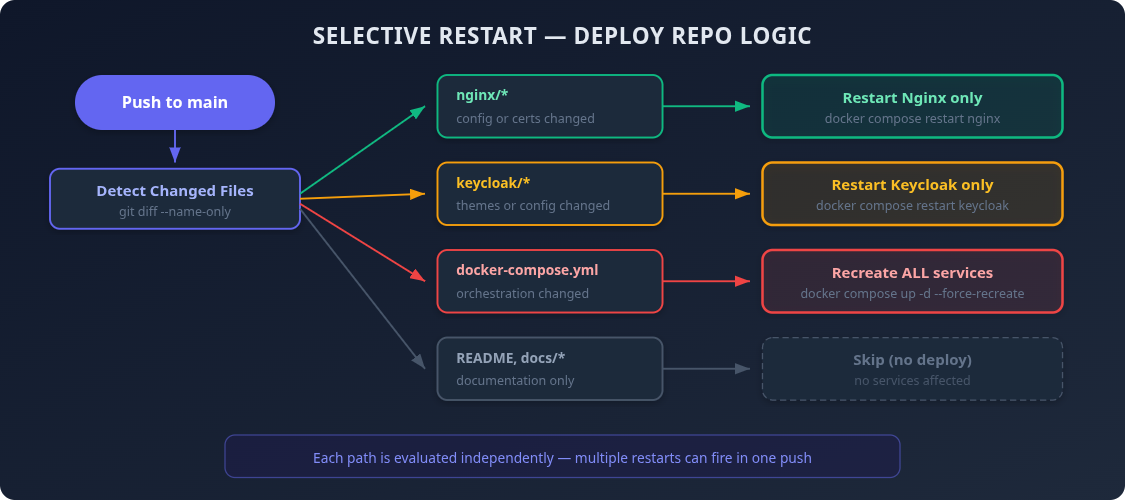
The deploy repo is different. It contains infrastructure config — Nginx rules, docker-compose, Keycloak themes. Not every change needs a restart, and restarting the wrong service for no reason is wasteful.
So instead of always restarting everything, the workflow detects which files changed and only restarts affected services:
```yaml
# .github/workflows/deploy.yml
name: Deploy
on:
push:
branches: [main]
jobs:
detect-changes:
name: Detect Changes
runs-on: ubuntu-latest
outputs:
nginx: ${{ steps.changes.outputs.nginx }}
keycloak: ${{ steps.changes.outputs.keycloak }}
compose: ${{ steps.changes.outputs.compose }}
steps:
- uses: actions/checkout@v4
with:
fetch-depth: 2
- name: Detect changed paths
id: changes
run: |
CHANGED=$(git diff --name-only HEAD~1 HEAD)
echo "nginx=false" >> "$GITHUB_OUTPUT"
echo "keycloak=false" >> "$GITHUB_OUTPUT"
echo "compose=false" >> "$GITHUB_OUTPUT"
if echo "$CHANGED" | grep -q '^nginx/'; then
echo "nginx=true" >> "$GITHUB_OUTPUT"
fi
if echo "$CHANGED" | grep -q '^keycloak/'; then
echo "keycloak=true" >> "$GITHUB_OUTPUT"
fi
if echo "$CHANGED" | grep -q '^docker-compose.prod.yml'; then
echo "compose=true" >> "$GITHUB_OUTPUT"
fi
echo "Changed files:"
echo "$CHANGED"
deploy:
name: Deploy to Production
needs: detect-changes
if: >-
needs.detect-changes.outputs.nginx == 'true' ||
needs.detect-changes.outputs.keycloak == 'true' ||
needs.detect-changes.outputs.compose == 'true'
runs-on: ubuntu-latest
steps:
- name: Deploy config changes
uses: appleboy/ssh-action@v1
env:
NGINX_CHANGED: ${{ needs.detect-changes.outputs.nginx }}
KEYCLOAK_CHANGED: ${{ needs.detect-changes.outputs.keycloak }}
COMPOSE_CHANGED: ${{ needs.detect-changes.outputs.compose }}
with:
host: ${{ secrets.VPS_HOST }}
username: ${{ secrets.VPS_USER }}
key: ${{ secrets.VPS_SSH_KEY }}
port: ${{ secrets.VPS_PORT }}
envs: NGINX_CHANGED,KEYCLOAK_CHANGED,COMPOSE_CHANGED
script: |
cd ~/app/deploy && git pull origin main
if [ "$COMPOSE_CHANGED" = "true" ]; then
echo "docker-compose.prod.yml changed - recreating all services..."
docker compose -f docker-compose.prod.yml up -d
else
if [ "$NGINX_CHANGED" = "true" ]; then
echo "Restarting nginx..."
docker compose -f docker-compose.prod.yml restart nginx
fi
if [ "$KEYCLOAK_CHANGED" = "true" ]; then
echo "Restarting keycloak..."
docker compose -f docker-compose.prod.yml restart keycloak
fi
fi
```
The logic:
| Changed files | What happens |
| --- | --- |
| `nginx/` configs | Restart only Nginx |
| `keycloak/` themes | Restart only Keycloak |
| `docker-compose.prod.yml` | Recreate all services |
| `README.md`, `articles/`, etc. | **Nothing** deploy is skipped entirely |
Multiple changes in one push work too. If you update both Nginx config and a Keycloak theme, both services restart. If you change the compose file, everything gets recreated regardless.
The `fetch-depth: 2` in the checkout step is important — without it, GitHub Actions does a shallow clone with only the latest commit, and `git diff HEAD~1 HEAD` would fail.
---
## Skipping Deploys for Docs-Only Changes
Both the frontend and API workflows use `paths-ignore` to skip the entire pipeline — CI included — when only documentation files change:
```yaml
on:
push:
branches: [main]
paths-ignore:
- '*.md'
- 'docs/**'
- 'LICENSE'
- '.gitignore'
```
This means updating a README doesn't trigger lint, tests, builds, or deployment. It saves CI minutes and avoids unnecessary container rebuilds.
The deploy repo handles this differently through the change detection job because its "docs" (articles, README) live alongside its config files. `paths-ignore` would be too coarse.
---
## What the Flow Looks Like
Here's the full picture for a typical frontend change:
```mermaid
flowchart TB
push["Developer pushes to main"] --> skip{"paths-ignore:
docs only?"}
skip -->|yes| done0(["Skip everything"])
skip -->|no| ci
subgraph ci["CI job"]
direction TB
c1["npm install"] --> c2["ESLint"] --> c3["Vitest (unit)"] --> c4["Playwright (E2E)"] --> c5["Vite build"]
end
ci --> gate{"All passed?"}
gate -->|no| fail(["Stop"])
gate -->|yes| deploy
subgraph deploy["Deploy job — SSH into VPS"]
direction TB
d1["git pull origin main"] --> d2["docker compose build frontend"] --> d3["docker compose up -d frontend"]
end
deploy --> live(["Live in production"])
classDef stop stroke:#dc2626,stroke-width:3px
classDef ok stroke:#16a34a,stroke-width:3px
class fail stop
class live ok
```
_The pipeline from a push to main: a docs-only change is skipped, otherwise CI runs lint, unit tests, E2E tests and the build, and only on success does the deploy job SSH into the VPS and rebuild the frontend_
From push to production: about 3-4 minutes. Most of that is CI — the deploy itself takes under 30 seconds.
---
## Gotchas
**1. Secrets must exist in every repo (or at org level).**
The first time I set this up, I configured secrets in one repo and forgot the other. The deploy job failed with `error: missing server host` not the most obvious error message for "your secret doesn't exist."
**2. Directory names on the VPS matter.**
My workflow scripts referenced `~/app/infra` but the actual directory was `~/app/deploy`. The SSH command succeeded (it connected fine) but the script failed with `cd: No such file or directory`. Double-check your paths match what's actually on the server.
**3. The deploy user needs Docker permissions.**
The deploy user must be in the `docker` group to run `docker compose` without `sudo`:
```bash
sudo usermod -aG docker
```
**4.** `git pull` **can fail if there are local changes.**
If someone ever edits a file directly on the VPS (a quick hotfix, a config tweak), `git pull` will fail with merge conflicts. The deploy script assumes the VPS repos are always clean. Discipline matters — all changes go through Git.
**5. Firewall rules for GitHub Actions.**
If your VPS firewall restricts SSH to specific IPs, you'll need to allow GitHub Actions runners. Their IP ranges are published at the GitHub meta API under the `actions` key, but they change frequently. An alternative is to use a VPN or bastion host.
---
## The Result
- **Zero manual SSH** for routine deployments
- **Three pipelines** — one per repo, each deploying only what changed
- **Gated deploys** — tests must pass before anything reaches production
- **Smart restarts** — config changes only restart affected services
- **Docs-only changes are free** — no CI, no deploy, no wasted time
The whole setup took about an hour. The time saved on the first week alone made it worth it.
---
## Update: What the Pipeline Does Now
The workflows above are the first version: pull, build, restart. Six months of running them in production changed a few things, each after a real incident or near miss:
- **Deploy the tested commit, not `main`.** The job passes `github.sha` to the VPS and runs `git checkout --force "$DEPLOY_SHA"`. `git pull` deploys whatever `main` points to by the time the SSH session starts, which may be a commit CI never saw.
- **Wait for health, and roll back.** `docker compose up -d --wait` fails the job if the container never turns healthy. Before building, the script records the running image ID; on failure it re-tags that image and brings it back up.
- **Fail loudly.** Every script starts with `set -euo pipefail`, and the deploy repo uses `git pull --ff-only`. A config file edited by hand on the server now stops the pipeline instead of letting it ship stale config and report success.
- **Validate nginx in a throwaway container.** `nginx.conf` is bind-mounted as a single file, and `git` replaces files by rename, so the running container keeps reading the _old_ inode. `nginx -t` inside it validates stale config and a reload silently changes nothing. The new config is tested in a fresh `docker run`, then nginx is recreated, not reloaded, and rolled back to the previous commit's config if it doesn't turn healthy.
- **A manual trigger.** `workflow_dispatch` with a target (`nginx`, `compose`, `keycloak`, `scripts`, `all`) replaces the empty commit that used to be the only way to re-run a deploy.
- **Prune the build cache.** Images were pruned after each deploy, the BuildKit cache was not, and it had quietly grown to 26 GB.
The lesson behind all of them: a green pipeline only proves the steps ran. Each of these makes the pipeline check the thing that actually matters — that the site is up and serving the code that was tested.
---
## What's Next
[Part 5: Hardening the VPS After a Cryptominer Got In](https://tirraflow.com/posts/hardening-a-self-hosted-vps-after-a-cryptominer-got-in) — how it got in, and the six layers that keep it out.
---
## The Series
_Building Tirraflow_ is a 5-part series on how the platform you are reading was built and run; every part is linked below.
| Part | Topic |
| --- | --- |
| [Part 1](https://tirraflow.com/posts/how-i-built-tirraflow-a-full-stack-blog-platform-from-scratch) | The stack, the architecture, and what I learned shipping it |
| [Part 2](https://tirraflow.com/posts/keycloak-silent-sso-in-react-no-loading-screens-no-redirects) | Non-blocking auth for a SPA, and why Keycloak ended up same-origin |
| [Part 3](https://tirraflow.com/posts/e2e-testing-a-react-spa-with-playwright-no-backend-required) | Testing the whole frontend with no backend at all |
| **Part 4** (this post) | From push to production, and how the pipeline learned to roll back |
| [Part 5](https://tirraflow.com/posts/hardening-a-self-hosted-vps-after-a-cryptominer-got-in) | How it got in, and the six layers that keep it out |